FAKRA Connector for Volkswagen Vehicles: Applications and Selection Guide

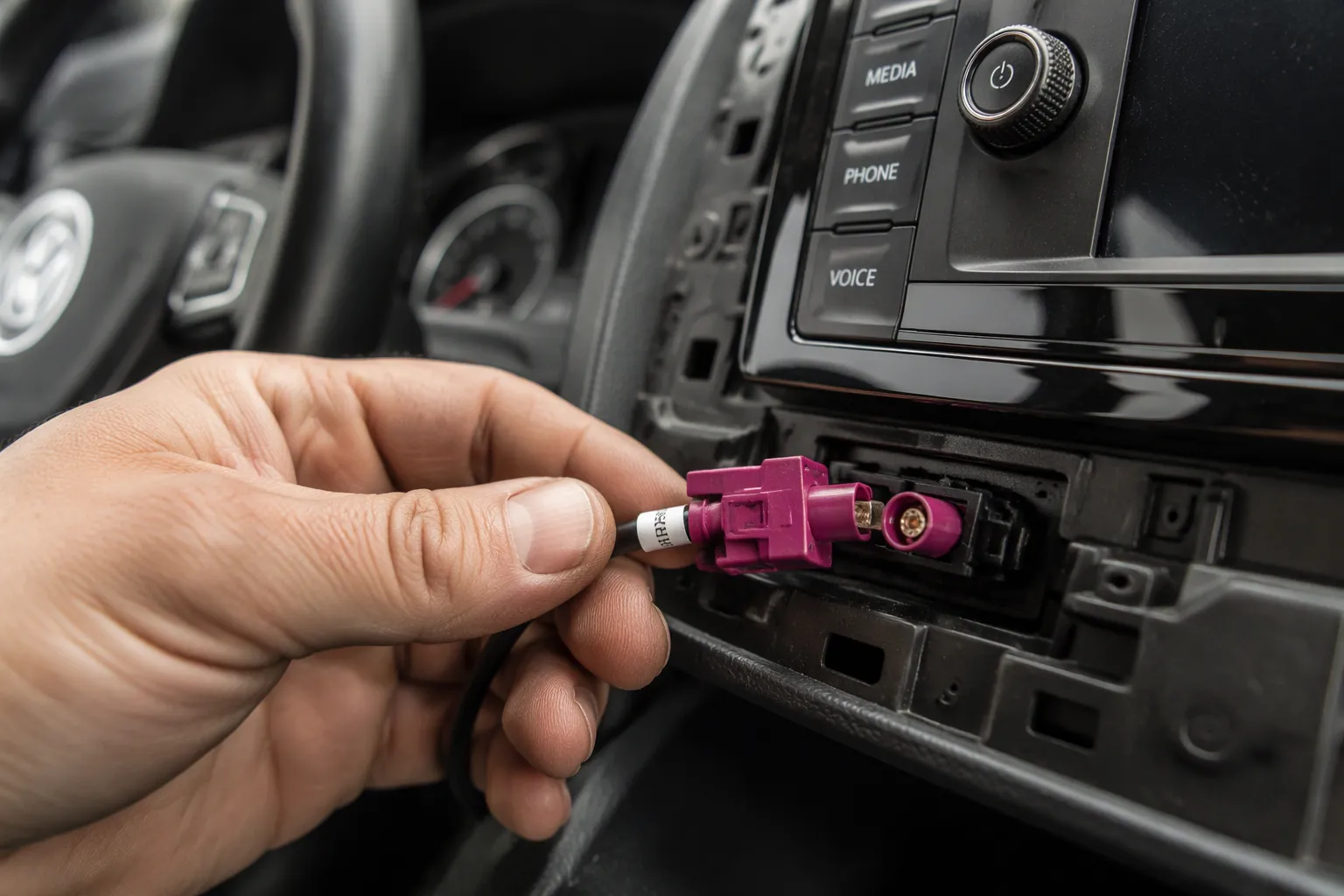
A Volkswagen FAKRA connector carries GPS/GNSS, AM/FM, satellite radio, telematics, LTE, Wi-Fi, and aftermarket navigation links. Selection depends on vehicle model, model year, OE system, antenna function, coding, gender, pinout, and installation requirements.
In Short: FAKRA connectors link Volkswagen antennas to GPS, radio, telematics, LTE, and Wi-Fi systems. Match coding, gender, pinout, and cable type to the specific vehicle before ordering.
No single VW FAKRA connector fits every Volkswagen. Confirm the original connector first.
Key Takeaways
FAKRA connectors link Volkswagen antennas to GPS, radio, telematics, LTE, and Wi-Fi systems.
Match the connector's coding, gender, and pinout to your specific vehicle before ordering.
Confirm the antenna function first, because a GPS connector will not work for radio or other systems.
Choose the right cable type and length to keep signal loss low and avoid interference.
Follow a step-by-step checklist to inspect, install, and test the connector for a reliable connection.
What Is a FAKRA Connector?
Definition and Key Characteristics
A FAKRA connector is a standardized 50-ohm RF coaxial interface for automotive high-frequency links. The German automotive standards body, Fachkreis Automobil, defined the original specification. The interface builds on a snap-on SMB-style electrical connection and adds a plastic keyed housing for retention and anti-cross-mating.
Data Alliance lists the core characteristics of the family. The table below summarizes the general specifications.
Specification | Value |
|---|---|
Impedance | 50 ohms (75-ohm variants exist for some broadcast/infotainment lines) |
Frequency range | Commonly specified up to roughly 4–6 GHz depending on the exact series and manufacturer |
Coupling | Snap-on (push-to-lock) with a positive detent, not threaded |
Typical coax | RG-174, RG-316, or 1.13 mm micro-coax |
Electrical interface | SMB-based (snap-on SMB-style mini coax connection) |
Housing | Plastic keyed-and-coded housing for mechanical retention and anti-cross-mating |
General FAKRA characteristics also include a return loss of at least 18 dB, an operating range of -40 °C to +105 °C, and at least 25 mating cycles. The connectors comply with RoHS, WEEE, and ELV requirements.
Coding, Locking, and Environmental Ratings
Color coding and mechanical keying work together as misuse-prevention features. Only male and female connectors with matching colors and mechanical keys can mate successfully. A keyed housing uses unique mechanical slots for foolproof pairing. Color coding gives quick visual identification. Polarization prevents reverse insertion.
Data Alliance lists typical housing colors by key code. Code A is black for general purpose and GPS plus SDARS combos. Code C is blue for GPS/GNSS at the 1575.42 MHz L1 band. Code D is pink or violet for keyless entry and cellular. Code Z is neutral or water blue for universal service parts.
Connector Supplier reports that FAKRA connectors offer a combination of 13 mechanical and color-coding features. The same source notes both primary and secondary locking systems for secure connections in harsh environments. Sealed versions reach IP67 when mated, and unsealed versions serve protected cabin locations. Installers should verify the coding against the vehicle rather than assume a color maps to one function.
Why Volkswagen Vehicles Use FAKRA Connectors
FAKRA has become the standard interface for in-vehicle antenna and telematics links. It combines secure locking with compact size. Volkswagen vehicles rely on this balance across many antenna functions, depending on the vehicle configuration.
Reliability and Standardization
A FAKRA connection uses two locking stages. The primary lock holds the connector body in place. The secondary lock secures the terminal inside the housing. This two-stage design resists vibration and accidental release. Installers hear and feel a positive click when the connector seats fully.
Standardization adds another layer of reliability. The interface follows one shared specification, so connectors from different suppliers mate predictably. Volkswagen can specify the same interface across multiple antenna functions and model lines. Service technicians then work with a familiar connection type, depending on the vehicle configuration.
Housing options support different installation needs. Separate housings save space. Combined housings group several links in one block. Waterproof variants protect connections in exposed locations, such as exterior antenna mounts. These general FAKRA advantages help maintain stable links over the vehicle's service life.
Space, Serviceability, and Signal Integrity
Modern Volkswagen cabins pack many systems into tight spaces. FAKRA answers this with a small snap-on body. The compact footprint suits camera modules, display units, and mirror assemblies. Molex reports that its High-Speed FAKRA-Mini line delivers up to 28 Gbps at frequencies up to 20 GHz in a compact form factor. That headroom supports radar, camera, and sensor links as vehicle networks grow.
Serviceability improves with push-to-lock coupling. Technicians do not need tools for a standard mating. They can disconnect a link, test it, and reseat it quickly during diagnosis.
Signal integrity remains critical in high-speed links for driver assistance and infotainment modules. Molex notes that low contact resistance, stable impedance, and electromagnetic interference mitigation support consistent performance over the vehicle's lifetime. A properly coded and fully locked FAKRA connection protects these electrical properties. Poor mating or damaged shielding undermines them.
Common Volkswagen FAKRA Applications
Volkswagen groups several antenna functions into one vehicle, and each function may use its own FAKRA link. The exact mix depends on the vehicle configuration. A base radio model and a fully connected infotainment model can carry very different connector counts behind the same dashboard.
GPS, Radio, and Satellite Systems
A Volkswagen GPS antenna connector feeds the navigation unit or telematics module with the GNSS signal. The link typically uses a coded housing, and blue Code C is the common general assignment for GPS/GNSS at the 1575.42 MHz L1 band. Installers should still verify the housing on the specific vehicle rather than trust the color alone.
The AM/FM radio antenna uses a separate FAKRA link. A VW radio antenna cable runs from the antenna module or rear window element to the radio tuner. This link carries broadcast frequencies, not navigation data. Its connector coding and cable impedance may differ from the GPS link, depending on the vehicle configuration.
Satellite radio adds another dedicated path. The satellite receiver needs its own antenna feed, and that feed uses its own coding. A satellite link and an AM/FM link often sit side by side in the same housing block. They remain electrically separate.
Telematics, LTE, Wi-Fi, and Aftermarket Upgrades
Telematics modules connect vehicles to emergency call and remote service systems. These modules use FAKRA links for their antenna feeds. LTE and mobile communication links follow the same pattern. Each cellular path needs a matched connector and a cable rated for the band in use.
Wi-Fi and connected vehicle systems add further links. These systems support hotspot service, software updates, and vehicle-to-device communication. Their antenna feeds use coded FAKRA interfaces like the other functions.
Aftermarket navigation and infotainment upgrades create the most common fitment question. An installer replaces a head unit or adds a navigation box. The new device needs an adapter that matches the original vehicle connector. The adapter must also match the new device interface.
One rule applies across every application. A connector used for GPS is not automatically suitable for radio, satellite radio, LTE, Wi-Fi, or another antenna function. Coding, impedance, and pinout can all differ. An installer who swaps connectors by appearance alone risks a poor match or a damaged terminal. Confirm the function first, then confirm the connector.
What Does "FAKRA plug VW" Mean?
"FAKRA plug" is German for FAKRA plug or FAKRA connector. "plug" translates directly as plug. German-speaking technicians, parts sellers, and vehicle owners use the term in catalogs, forum posts, and marketplace listings. English-speaking buyers meet the same phrase when they search for replacement parts on European supplier sites.
"FAKRA plug VW" is a common search phrase for VW-fit FAKRA connectors. The phrase combines the connector family name with the vehicle brand. A buyer types it to find a plug that fits a Volkswagen antenna or telematics link. Sellers use it as a listing keyword for the same reason.
The phrase describes a connector family and a fitment context. It does not name a single universal part. Volkswagen uses FAKRA links across many antenna functions and model lines. Each link can carry its own coding, gender, housing style, and pinout. A listing labeled "fakra stecker vw" may therefore cover one specific configuration only.
Buyers should treat the phrase as a starting point, not a specification. The correct part depends on the vehicle configuration. Model year, original equipment system, and antenna function all shape the requirement. A connector that fits one Volkswagen link may not fit another link in the same vehicle.
The practical step is verification. Read the full listing details and compare them with the original connector. Check the coding, the color, the gender, and the cable type. A search phrase narrows the field. It does not replace a physical check of the vehicle connector.
Identifying the Correct VW FAKRA Connector
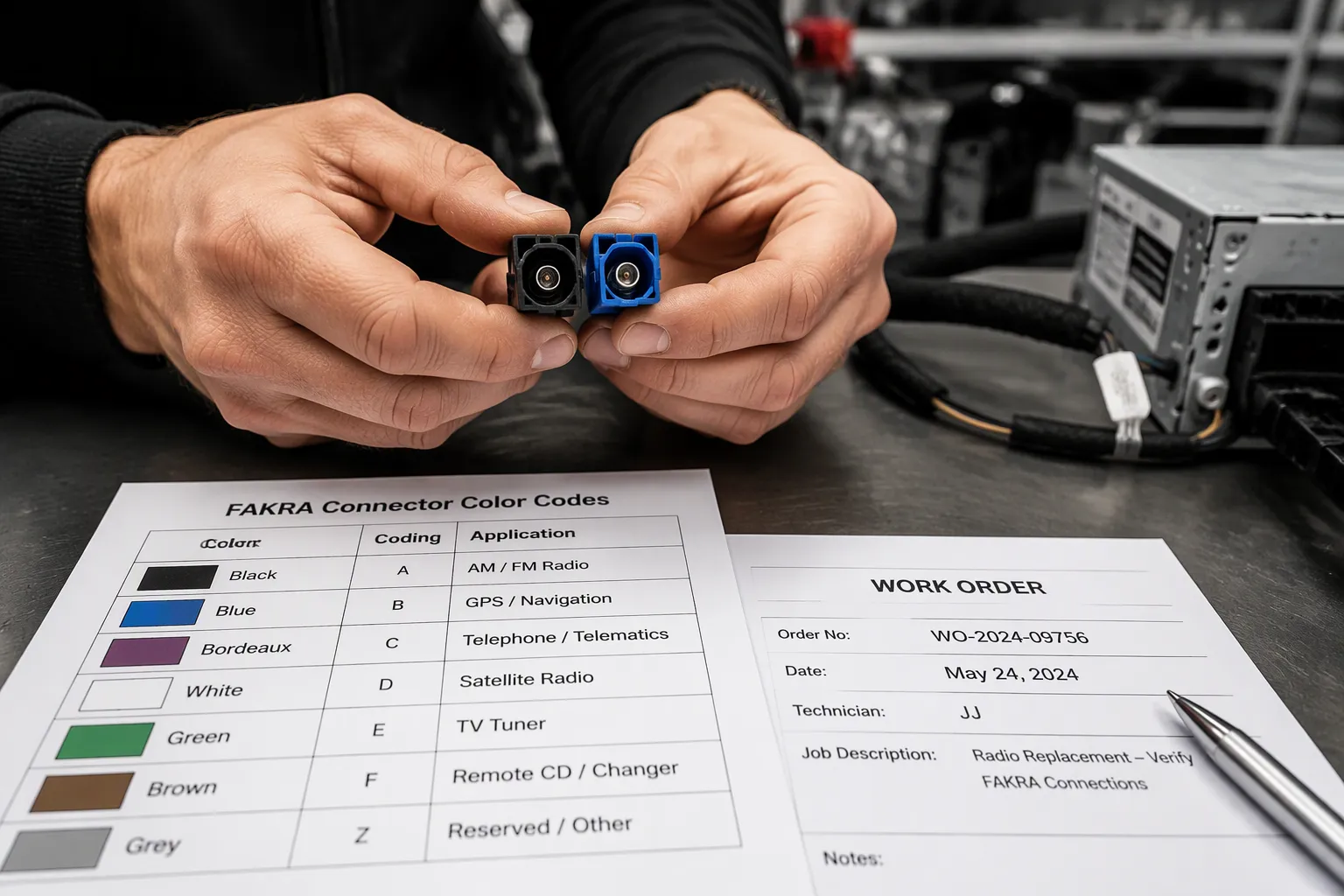
A correct fit starts with a physical check of the vehicle, not a catalog guess. The installer works through nine checks in order. Each check narrows the options until one match remains.
Coding, Color, and Gender
Coding is the first check. Each FAKRA housing carries a mechanical key profile. PCM Cable reports 14 standard codes (A–N) plus a universal Z code. Each code has a unique color and keying profile. The keying stops a GPS cable from plugging into a radio port. The table below lists the common assignments.
Code | Color | Keying | Typical Application |
|---|---|---|---|
A | Black | 0 | GPS |
B | White | 1 | Cellular |
C | Blue | 2 | AM/FM Radio |
D | Bordeaux | 3 | SDARS |
E | Green | 4 | TV (Analog) |
H | Gray | 7 | Audio/Video |
K | Aqua | 10 | Keyless Entry |
L | Pink | 11 | Navigation Display |
M | Orange | 12 | Camera Systems |
Z | Water Blue | Universal | Multi-Use |
Color alone does not confirm a match. Two suppliers may label the same color differently. The installer reads the key slot and compares it with the original housing. The Z code is non-keyed and mates with any coded jack, per PCM Cable. That flexibility suits service parts, but it does not confirm the antenna function. The installer records the code letter and the color on the work order.
Gender is the next check. A FAKRA plug carries a male contact. A jack carries a female contact. The Dosinconn listing for a Fakra-to-dual-Fakra cable shows a Fakra plug, A code, male contact on one end and a dual Fakra jack, F code, female contact on the other. The same listing specifies a PA66+30%GF housing, a copper contact, and a PTFE insulator. The installer notes which side sits on the vehicle harness and which side sits on the device.
Cable Position, Angle, Locking, and Pinout
Cable position and angle decide whether the connector fits the space. A straight body needs clearance behind the radio. A right-angle body turns the cable along the panel. The installer measures the gap before ordering.
The locking mechanism needs a full click. A partial seat passes a quick pull test but fails on the road. The installer pushes until the primary lock engages and then checks the secondary lock.
The original vehicle connector is the reference. The installer photographs it from three angles: face, side, and cable exit. The photo captures the key slot, the color, and the housing shape. A photo beats a description every time.
Antenna function sets the electrical requirement. A GPS link and a radio link may share a housing block but never share a circuit. The installer confirms the function against the head unit or module label.
Pinout is the final check. The terminal layout must match the device port. A wrong pinout can pass mechanically and still fail electrically. The installer confirms coding and pinout with the supplier before ordering. That step prevents a return and a second dashboard removal. A verified VW FAKRA connector saves both time and cost.
FAKRA Cable and Adapter Options
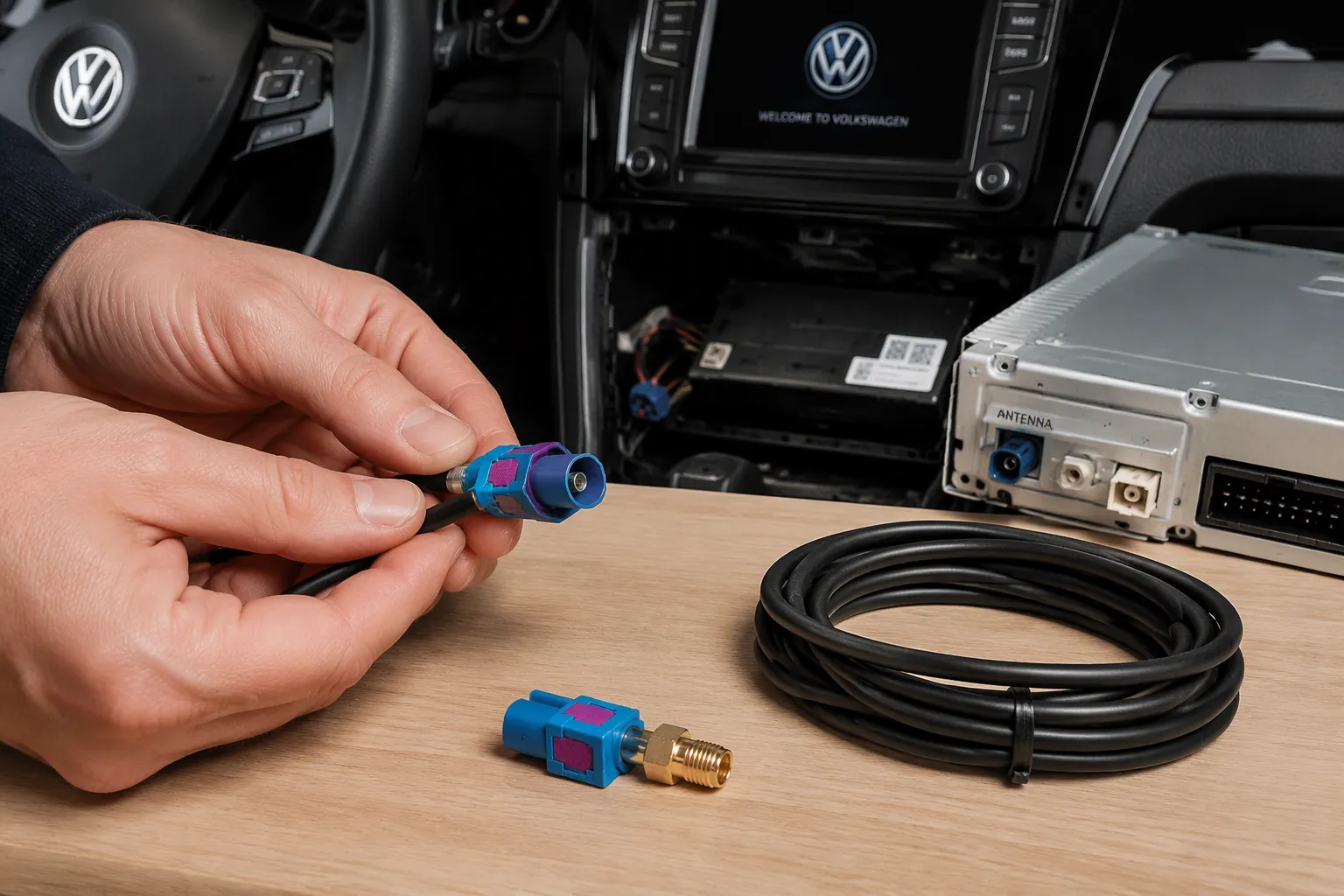
Volkswagen installations rarely need just a bare connector. Most jobs need a finished cable or adapter that bridges the vehicle port and the new device. The right option depends on the run length, the two interfaces involved, and the space behind the panel.
Extension, Coaxial, and Antenna Adapters
A [FAKRA extension cable] adds length between an existing vehicle link and a relocated device. Installers use one when a new head unit sits farther from the antenna module than the original harness allowed. Confirm the coding and gender on both ends before ordering.
A [FAKRA coaxial cable] carries the RF signal itself. These assemblies use 50-ohm coax and a coded housing on each end. Buyers should not confuse FAKRA 50-ohm RF connectors with HSD 100-ohm differential connectors, per LEADSIGN's technical article on FAKRA-to-SMA cables.
A [FAKRA antenna adapter] changes one interface to another without a long cable run. Adapters suit tight spaces where a pigtail would kink. LEADSIGN supplies FAKRA connectors, coaxial cables, antenna adapters, extension cables, Mini FAKRA connectors, HSD cables, LVDS cables, and [custom automotive cable assemblies].
FAKRA to SMA and LEADSIGN Custom Assemblies
A FAKRA to SMA cable is a hybrid RF assembly. One end carries a FAKRA connector; the other carries an SMA connector. FAKRA connectors typically operate up to 6 GHz, while SMA connectors typically handle frequencies up to 18 GHz, according to LEADSIGN. Common coax options include RG174A/U, RG316/U, and LMR-100A.
LEADSIGN's article compares a direct FAKRA-to-SMA adapter with a cabled pigtail. The adapter eliminates coax cable loss and has no wire to break or vibrate loose. The pigtail adds a cable segment, and its thin coax can sap signal or fail on the road.
Option | Typical Application | Connector Information to Confirm | Main Selection Concern | Suitable Buyer |
|---|---|---|---|---|
GPS FAKRA cable | GNSS antenna to navigation or telematics module | Coding, gender, 50-ohm impedance | Correct code for the GPS port | Installers adding navigation |
Radio antenna FAKRA cable | AM/FM antenna to tuner | Coding, cable type, length | Match to the radio port, not GPS | Radio and audio installers |
FAKRA extension cable | Relocated device or longer run | Coding and gender on both ends | Length and routing clearance | Aftermarket accessory fitters |
FAKRA antenna adapter | Interface change in tight space | Both interface types, coding | Adapter vs. pigtail trade-off | Repair and retrofit technicians |
FAKRA to SMA cable | Test gear or SMA-equipped device | 50-ohm impedance, coax type | Signal loss over the cable run | Test engineers and integrators |
Custom FAKRA cable assembly | Non-standard length or combined ends | Full drawing, pinout, coding | Design verification before build | OEM and system integrators |
Choosing a Volkswagen GPS Antenna Cable
GPS antenna cable selection depends on the head unit or telematics module interface, the cable length, and the routing path. The installer confirms the port type first. A Volkswagen GPS antenna connector must match the module coding and gender. The run length then sets the coax choice.
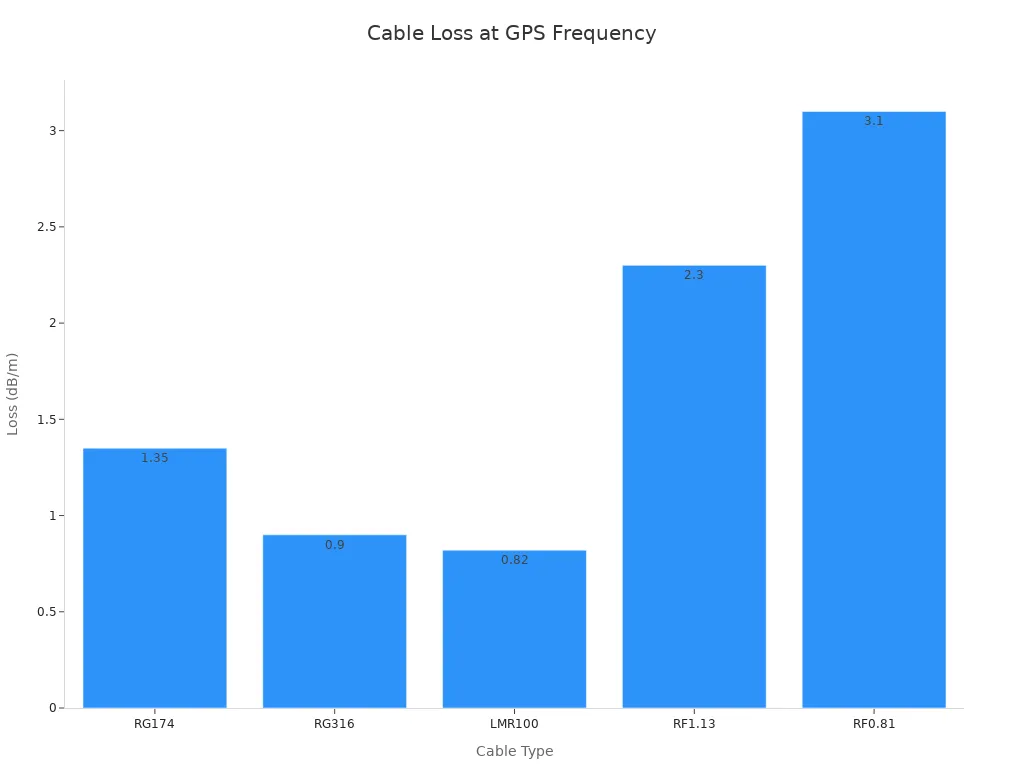
Every meter of coax removes part of the signal. The center conductor and dielectric absorb RF energy, and that loss grows with frequency and run length. The table below shows loss per meter at the 1.575 GHz GPS band, as reported by LEADSIGN's FAKRA GPS antenna cable guide.
Cable | Loss at 1.575 GHz (dB/m) | Typical passive run |
|---|---|---|
RG174 | ~1.2–1.5 | 2–3 m |
RG316 | ~0.9 | 3–4 m |
LMR100 | ~0.82 | 4–5 m |
RF1.13 | ~2.3 | 1 m or less |
RF0.81 | ~3.1 | 0.5 m or less |
Logistimatics reports that standard RG174 cable loses roughly one decibel of gain per meter. A long route may need a lower-loss coax or an active antenna with a compatible bias supply. Logistimatics advises an active GPS antenna once a run exceeds three meters. Siretta adds a caution: more gain is not automatically better, and the antenna must match the receiver's DC bias voltage and current.
Shielding and routing control noise. Logistimatics advises routing the cable away from ignition systems and other antennas. The installer keeps the path clear of high-current power cables, alternators, electric motors, and inverters. Asialeren recommends holding the minimum bend radius at 10 times the diameter. A damaged braid lets outside energy reach the center conductor, and poor grounding gives interference a return path into the receiver.
Termination quality decides whether the link survives vibration. Poor crimping raises contact resistance and can open the circuit on the road. The installer secures the run with clips and strain relief. A sealed housing protects exterior connections from moisture. A quality automotive FAKRA connector and a correctly sized FAKRA cable for Volkswagen keep the as-built path within loss limits.
Common Volkswagen FAKRA Connector Problems
Most FAKRA faults trace back to a mismatch or an installation error, not a failed part. The table below pairs each common problem with its symptom and the check that resolves it.
Problem | Symptom | Corrective Check |
|---|---|---|
Connector will not seat in the port | Compare the key slot and color with the original housing | |
Wrong connector gender | Plug meets plug, or jack meets jack | Confirm male contact on the harness side and female on the device side |
Incompatible antenna function | Weak or absent signal on one band only | Verify the link serves the intended function, such as GPS versus radio |
Incorrect pinout | Connector seats but the circuit fails | Trace the terminal layout against the module port |
Poor crimping | Intermittent dropouts under vibration | Pull-test the terminal and inspect the crimp barrel |
Incomplete locking | Connector releases on rough roads | Push until the primary lock clicks, then seat the secondary lock |
Damaged shielding | Noise or interference on the signal | Inspect the braid and confirm continuity end to end |
Cable routed near electrical noise | Static or degraded reception | Reroute away from power cables, alternators, and inverters |
Mismatched aftermarket equipment | New device shows no signal | Confirm the adapter matches both the vehicle port and the device interface |
An installer should work through the checks in order. Coding and gender come first, because a mechanical mismatch stops the job immediately. Electrical checks follow once the connector seats. A signal test at the end confirms the repair.
One pattern deserves attention. A connector that seats easily but performs poorly often hides a pinout or shielding fault. The installer should not trust a clean click as proof of a good link. A quick continuity check on the shield and a terminal inspection catch most of these cases before the panel goes back on.
Inspection and Installation Checklist
A repeatable checklist turns a risky install into a controlled one. The installer works through the same steps on every Volkswagen job. Each step catches a different class of fault, and the order matters. Mechanical checks come before electrical ones, and the signal test comes last.
The list below covers the full sequence from inspection to final verification. An installer can print it and attach it to the work order.
Inspect the original connector visually. Photograph the face, the side, and the cable exit. Note any cracked housing, bent terminal, or frayed braid.
Confirm the coding match. Compare the key slot and color of the new part against the original housing. A mismatched key will not seat, and forcing it damages both sides.
Confirm the gender match. Verify the male contact sits on the harness side and the female contact sits on the device side, or the reverse, as the vehicle requires.
Seat the connector and confirm locking. Push until the primary lock clicks. Then verify the secondary lock engages fully.
Check crimp quality. Pull-test each terminal and inspect the crimp barrel for stray strands or a partial bite.
Verify shielding continuity. Run a continuity check from one connector shell to the other. A failed check points to a broken braid or a poor ground.
Route the cable away from noise sources. Keep the run clear of alternators, inverters, electric motors, and high-current power cables. Respect the bend radius and add strain relief.
Perform a final signal check. Power the system and confirm reception on the intended band. Test GPS lock, radio reception, or the telematics link as applicable.
A completed checklist also serves as a record. The installer notes the code letter, the color, and the test result on the work order. That record speeds up any future diagnosis and supports a warranty claim if one arises. A documented install protects both the technician and the vehicle owner.
Information to Provide Before Requesting a Quotation
A supplier cannot quote the right part from a vehicle name alone. The buyer should gather a complete data set before sending an inquiry. This step protects both sides from a wrong shipment and a second dashboard removal.
The buyer collects twelve inputs. Each one answers a question the supplier would otherwise have to ask.
Volkswagen model — the platform and body style narrow the antenna layout.
Production year — mid-cycle changes can alter the connector behind the panel.
Original system — the factory radio, navigation unit, or telematics module sets the baseline.
Antenna function — GPS, AM/FM, satellite radio, LTE, Wi-Fi, or another link.
Connector photo — a clear shot of the face, the side, and the cable exit.
Connector coding — the key letter and the housing color.
Connector gender — male plug or female jack on the vehicle side.
Cable length — the required run in meters, measured along the planned route.
Required adapter — the interface on the new device, such as SMA or a second FAKRA port.
Pinout — the terminal layout at the module port.
Quantity — the number of assemblies for the job or the production batch.
Installation environment — cabin, exterior mount, or an exposed location that needs a sealed housing.
Complete information reduces mis-selection risk. A supplier can cross-check the coding against the photo and confirm the pinout before quoting. Missing details force assumptions, and assumptions lead to returns.
The buyer should send the photo with the inquiry, not after. A picture of the original connector settles most coding questions in one glance. The buyer should also state the antenna function in plain terms. "GPS" and "radio" are different circuits, and the supplier needs that distinction to quote correctly.
A complete request also speeds up the reply. The supplier can confirm the part, the cable length, and the adapter in a single response. No model numbers are needed at this stage. The vehicle details and the connector evidence carry the quote.
When to Choose a LEADSIGN Custom FAKRA Cable Assembly
A standard cable solves most Volkswagen jobs. A custom assembly earns its place when the vehicle, the device, or the route falls outside the standard range. The installer should weigh four fit cases before ordering.
Non-standard lengths. A relocated head unit or a rear-mounted device may need a run that no catalog cable covers. LEADSIGN supplies pre-terminated FAKRA cables in any length from 0.3 m to 20 m, according to LEADSIGN's VW FAKRA guide.
Combined connector types. One assembly may need a FAKRA plug on the vehicle side and an SMA or second FAKRA port on the device side.
Specific routing needs. A tight panel gap may call for a right-angle body or a sealed housing. LEADSIGN offers IP67 as an option on its pre-terminated cables.
Unusual aftermarket interfaces. Some navigation boxes and telematics units use ports that no off-the-shelf adapter matches.
A custom build also protects signal quality. LEADSIGN's guide warns that a poorly matched assembly can create an impedance mismatch. A pre-terminated cable removes that risk, because the factory sets the termination and the impedance together.
LEADSIGN runs an OEM and ODM service for these cases. An experienced design team reviews the drawing, the coding, and the pinout before production. Strict quality management then covers the build and the final check. The company is not an official Volkswagen supplier, and the custom route suits any vehicle configuration that needs a verified fit.
The buyer should send the full quotation data set with the custom request. A connector photo, the coding, the gender, and the planned route give the design team what they need. The result is a cable that matches the vehicle port and the device port in one part.
FAKRA vs. SMA, U.FL, and N-Type Connectors
Each connector family serves a different job. A buyer who compares them on price alone misses the design intent behind each one. The right choice depends on the link, the environment, and the service life.
Where Each Connector Fits Best
FAKRA suits automotive antenna and telematics links. Its plastic locking housing and keyed coding prevent cross-mating, and sealed versions handle exposed locations. Wellshow rates FAKRA vibration resistance at four stars against two for SMA. That margin matters on a vehicle that sees constant road vibration.
SMA fits lab, test, and general RF work. The threaded coupling gives a stable, repeatable connection on the bench. Wellshow lists SMA coverage to 18 GHz, well above the 6 GHz FAKRA range. U.FL fits compact board-level links inside modules, drones, and laptop Wi-Fi cards. MCCCable notes that U.FL saves space but supports only a limited number of mating cycles. N-type fits larger outdoor and high-power RF systems, where its threaded body handles heavier duty.
Performance, Size, and Cost Trade-offs
The Alibaba buying guide gives a per-interface budget range for each family. SMA runs $1–$12, U.FL runs $0.30–$2.50, traditional FAKRA runs $8–$20, and Mini FAKRA runs $5–$35. The table below summarizes the trade-offs.
Solution | Best For | Design Characteristic | Budget (per interface) |
|---|---|---|---|
Mini FAKRA | OEM-aligned installs, multi-camera, GPS/LTE | Automotive coding and sealing | $5–$35 |
SMA | Lab testing, bench prototyping | Easy to mate, controlled environments | $1–$12 |
U.FL/IPEX | Internal PCB antenna feeds | Ultra-compact board-level link | $0.30–$2.50 |
Traditional FAKRA | Legacy repairs, high-power active antennas | Robust, larger form factor | $8–$20 |
Size follows the same pattern. Mini FAKRA sits between SMA and U.FL in footprint, per the Alibaba guide. U.FL wins on density, and N-type takes the most panel space. Cost tracks complexity, not quality. A low-cost U.FL serves its board-level role well. A FAKRA part earns its higher price through coding, sealing, and vibration resistance. Each family fits its own use case.
FAKRA connectors serve Volkswagen GPS/GNSS, radio, satellite radio, telematics, LTE, Wi-Fi, and aftermarket links. Correct selection depends on model, year, OE system, coding, gender, pinout, and installation needs. No single part covers every configuration, so the vehicle sets the requirement.
The identification and quotation checklists turn that requirement into a repeatable process. An installer photographs the original connector, records the coding and gender, and sends the data set with the inquiry. Readers should confirm the original connector before ordering any VW FAKRA connector. FAKRA, SMA, U.FL, and N-type each fit different needs, so match the family to the link. For a suitable connector, adapter, or custom cable assembly, contact LEADSIGN at info@leadsignauto.com.
FAQ
Does the housing color alone confirm the right FAKRA connector for a Volkswagen?
No. Color gives a quick visual cue, but two suppliers may label the same color differently. The installer should compare the mechanical key slot with the original housing and record the code letter. A neutral Z code mates with any coded jack, so it does not confirm the antenna function.
Can an installer use a GPS FAKRA connector for the radio antenna instead?
No. GPS and radio links are separate circuits, even when they share one housing block. Coding, impedance, and pinout can all differ between them. The installer should confirm the antenna function against the head unit or module label before ordering any replacement.
How many times can a FAKRA connector be mated and unmated?
General FAKRA specifications rate the interface for at least 25 mating cycles. Repeated diagnosis and reseating slowly wear the contact and the locking detent. An installer who expects frequent rework should plan to replace the connector rather than rely on the original one indefinitely.
When does a Volkswagen installation need a sealed FAKRA connector?
A sealed housing suits exterior antenna mounts and other exposed locations. Sealed versions reach IP67 when fully mated. Cabin links behind the dashboard normally use unsealed housings. The installer should match the housing to the installation environment and confirm the seal rating with the supplier.
What should a buyer check before ordering a VW antenna connector?
The buyer should photograph the original connector, record the coding and gender, and confirm the pinout at the module port. Model, production year, and antenna function complete the picture. A supplier can then cross-check the photo against the requested part and reduce the risk of a wrong shipment.
See Also
An Essential Guide to Fakra Connectors in Honda Vehicles
Complete Guide to Fakra Connectors: Benefits, Uses, and Installation Tips
A Complete Guide to Fakra Connectors in Ford Vehicles
A Thorough Guide to Fakra Connectors: Fundamentals, Types, and Uses
A Complete Guide to Understanding Fakra Connectors for Everyone