How FAKRA Cable Length Affects GPS Signal Quality in Vehicles

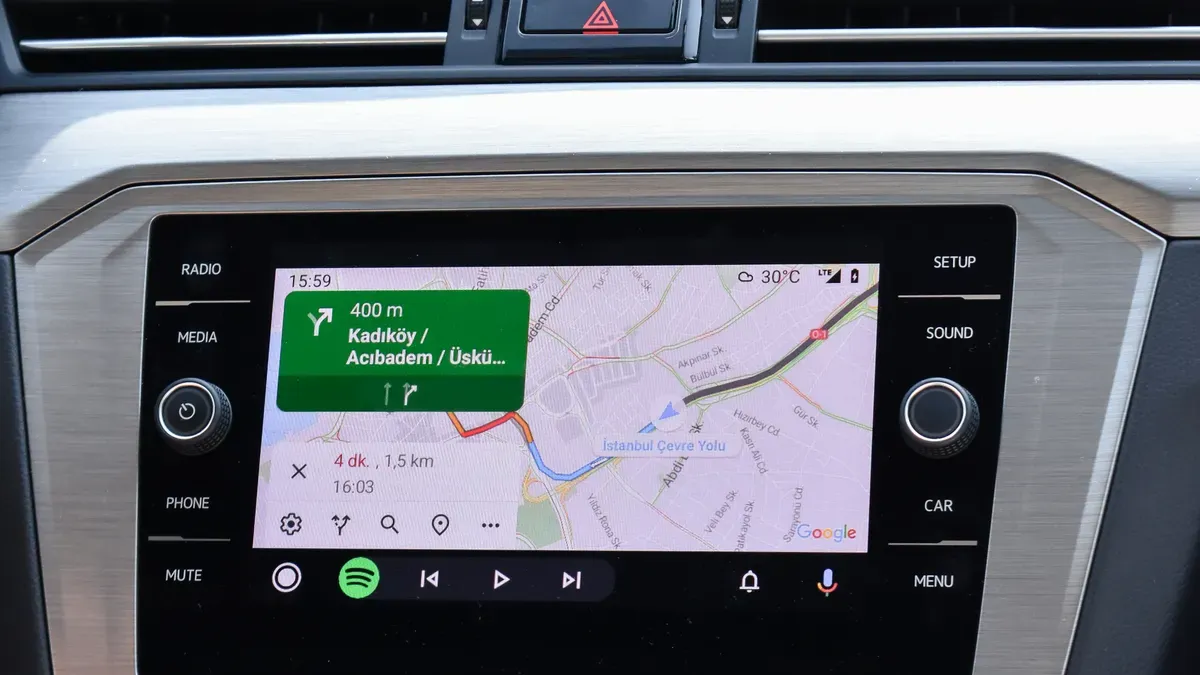
A car installer runs a FAKRA cable from a GPS antenna behind a delivery van’s dashboard. The van uses ADAS for navigation. Later, the installer notices the GPS takes a long time to lock onto satellites and the signal cuts in and out.
Yes, FAKRA cable length changes GPS signal quality through signal loss. But the cable type, connectors, and installation matter just as much. Use the shortest cable that works and pick one with low loss. For longer cable runs, think about using a cable with even less loss, an active antenna, or a custom cable set. Always check the receiver and antenna needs first. This article explains how the design of FAKRA connectors affects the signal for car ADAS systems.
Key Takeaways
Longer FAKRA cables make GPS signals weaker because they lose more signal strength over distance.
Pick a low-loss cable type like LMR100 for longer runs so the signal stays strong.
For long cable runs, use an active antenna to boost the signal before it travels.
Keep cable bends smooth and away from power sources to stop interference.
Choose the shortest cable that works, and check what your receiver needs for the best performance.
Why FAKRA Cable Length Matters for GPS Antenna Systems
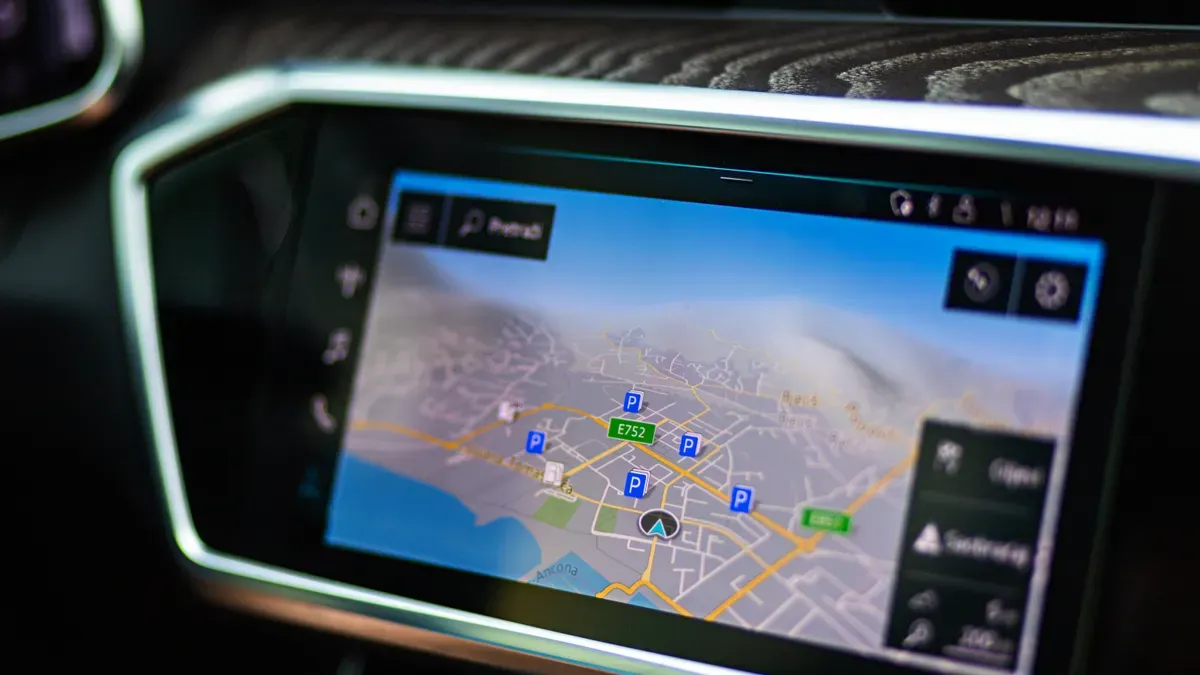
A FAKRA cable sends weak RF energy from your GPS antenna to the receiver. Each inch of that path adds resistance to the signal. Engineers call this insertion loss. The longer your cable, the more signal you lose before it reaches the receiver.
FAKRA is a 50-ohm automotive RF connector system. Do not mix it up with HSD 100-ohm differential connectors. These two systems do different jobs. FAKRA handles single-ended RF signals for GPS, GNSS, and other automotive antenna uses. The 50-ohm impedance matches the coaxial cable and the receiver input. This match keeps signal reflections low and protects signal integrity along the path.
Insertion Loss per Foot and Receiver Sensitivity
Insertion loss shows how much signal strength your cable takes away per unit of length. Cable makers list this loss in decibels per foot or per meter at a given frequency. A thin cable like RG-174 loses more signal per foot than a thicker cable like RG-58. The exact loss depends on the cable type, the GPS signal frequency, and the assembly quality.
Your GPS receiver has a sensitivity threshold. Below that threshold, the receiver cannot find or track satellites. A high-sensitivity GNSS receiver can pick up weak Galileo E1b/c signals with a C/N0 as low as 20 dB-Hz and still get navigation solutions. Time-to-first-fix often falls between 1 and 2 minutes in these conditions. But position determination can get hard when signals sit near that weak-signal threshold.
A 3 dB loss cuts your signal power in half. This loss pushes the received signal closer to the receiver's sensitivity limit. Under stated assumptions, a 3 dB drop in GNSS receiver C/N0 equals a required separation distance of about 40.3 m. This number assumes an isotropic receive antenna, free-space path loss, and 3 dB polarization loss. The relationship shows how a small loss lowers your effective sensitivity margin.
How Signal Attenuation Affects Time to First Fix and Accuracy
Signal attenuation slows satellite acquisition. Your receiver needs enough signal strength to decode satellite ephemeris data and compute a position fix. Weaker signals take longer to process. In marginal conditions, the receiver may fail to lock onto enough satellites for a reliable solution.
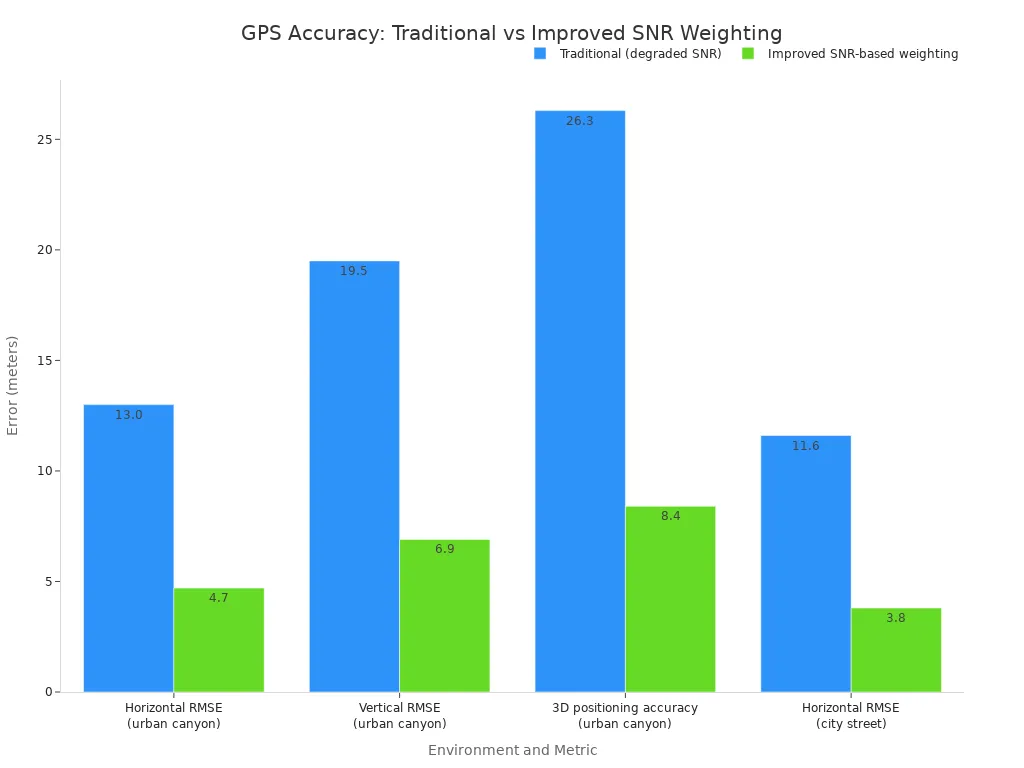
Attenuation also hurts positional accuracy. Research on SNR-based weighting shows the impact. In urban canyon environments, traditional processing with degraded SNR gave a horizontal RMSE of 13.0 m. Improved SNR-based weighting cut that error to 4.7 m. Vertical RMSE dropped from 19.5 m to 6.9 m. On city streets, horizontal RMSE improved from 11.6 m to 3.8 m. These results show that signal quality directly affects positioning performance.
You can browse the FAKRA coaxial cable category to review cable options for your specific project needs. The right cable depends on your loss budget, routing space, and receiver requirements. A longer cable run does not automatically fail. However, you must account for the extra loss and choose a cable type that keeps your signal above the receiver threshold.
Automotive ADAS and navigation systems demand reliable GPS performance. The cable length you select affects that performance. Understanding insertion loss helps you make better design decisions for your automotive antenna cable assemblies.
What Happens When a FAKRA GPS Cable Is Too Long?
A cable that runs too far does not break right away. It weakens the link step by step. First you lose extra signal room, then you lose satellites. Receiver sensitivity has a limit, so each extra foot of cable takes away space between a signal you can use and one you cannot.
Symptoms of Excessive Cable Loss
The first sign appears in the carrier-to-noise density ratio, or C/N0. This number shows how strong the satellite signal is compared to background noise. A long cable lowers C/N0 on every satellite your GPS antenna can see. You might still get a fix, but the numbers look weak.
Cold starts slow down next. The receiver must decode ephemeris data from each satellite before it can figure out a position. Weak signals make that decoding take more time. A cold start that once took seconds may now take minutes.
The worst sign is loss of lock. In tough conditions, like urban canyons, tree cover, or a parking garage entrance, the receiver drops satellites it was tracking. The fix jumps around or vanishes. This occurs because the signal drops below the tracking threshold, not because the satellite moved.
The Active vs. Passive Antenna Decision Point
A passive GPS antenna sends whatever signal it catches straight down the cable. Every foot of that cable removes part of the signal before it reaches the receiver. A long run with a passive antenna leaves very little margin.
An active antenna has a low-noise amplifier inside the housing. It boosts the signal at the antenna, before cable loss takes its share. This design protects the automotive link on longer runs. The amplifier needs power, which the receiver or a bias tee usually sends through the same coaxial cable.
Pick an active antenna when your cable run is long, when your receiver has modest sensitivity, or when the installation sits near noise sources. Stay with a passive antenna for short, direct runs where loss stays low. Always check that the receiver can supply the needed bias voltage before you switch designs.
Cable Type, Shielding, and Connector Quality Matter More Than Length Alone
The cable you pick shapes your GPS link as much as its length does. A thin, lossy cable on a short run can do worse than a thicker, low-loss cable on a longer one. You must match the cable to your loss budget, routing space, and project needs.
Selecting the Right FAKRA Cable Type
Common coaxial choices for automotive FAKRA cable assemblies are RG-174, RG-58, RG-316, and LMR100. Each type balances loss, flexibility, diameter, and cost in its own way. RG-174 bends very easily and has an outer diameter near 2.8 mm, so it fits tight bends in short runs. LMR100 is about the same size but loses less signal. At 1 GHz, RG-174 loses 2.1 dB per meter while LMR100 loses 1.1 dB per meter. At 2.4 GHz, the gap grows to 6.6 dB per meter versus 3.9 dB per meter. At 5.8 GHz, RG-174 hits 11.0 dB per meter and LMR100 hits 6.7 dB per meter.
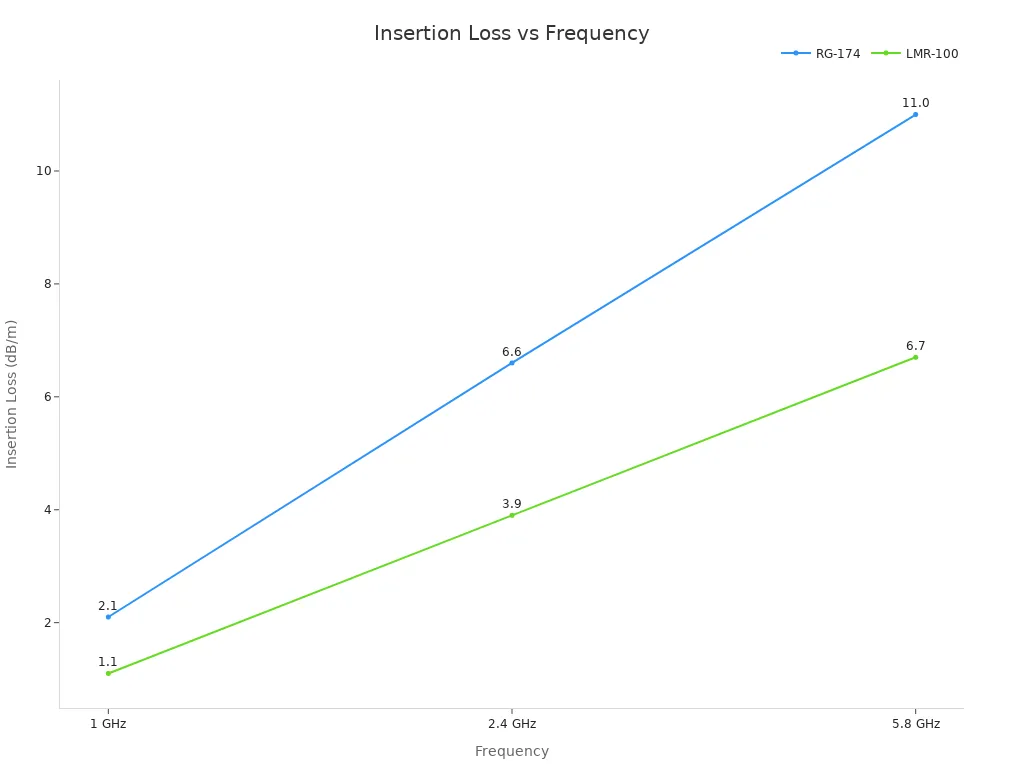
These numbers show why bandwidth matters for your design. Higher frequencies lose more signal. GPS signals sit near 1.5 GHz, so the 1 GHz column gives you a rough guide. The right cable type depends on loss, flexibility, diameter, shielding, routing space, and project requirements. No single cable works for every job.
Connector Termination, Adapters, and Shielding Integrity
A bad crimp or a loose connector can ruin the best cable. The shield must connect fully to the connector body. Gaps in the shield let noise slip into the transmission path. That noise hurts signal integrity and weakens your GPS fix.
Adapters add one more loss point. Every FAKRA antenna adapter you stack in the line adds insertion loss and a chance for a bad connection. Use as few adapters as you can. When you need to change connector codes, pick a quality adapter rated for your frequency range.
Shielding quality differs across cable types. Look for high braid coverage and foil layers. These features block interference from nearby electronics. A well-shielded cable protects your signal even in a noisy automotive environment.
FAKRA Cable Length Guidelines for GPS, GNSS, and Navigation
You need a simple way to match cable length to your project. The table below gives you a place to start. Use it to guess loss and choose a direction for your design.
Cable Length Range | Typical Cable Type | Estimated Insertion Loss (typical) | Installation Use Case | Recommendation |
|---|---|---|---|---|
Short (3–10 ft) | RG‑174, RG‑58 | 0.5–2.0 dB | Direct connect under dash | Use standard FAKRA cable; minimal risk |
Medium (10–20 ft) | RG‑58, LMR100 | 1.5–4.5 dB | Passenger vehicle routing | Choose low‑loss cable; consider active antenna |
Long (20–30 ft) | LMR100, custom | 3.0–7.0 dB | Fleet vans, large RV | Use active antenna or inline amplifier; custom assembly recommended |
These ranges fit many car layouts. Your real loss depends on the cable you pick and your signal frequency. GPS sits near 1.5 GHz, so check the loss curve there. A short run inside the dashboard is usually safe with standard cable. A medium run from the roof to the head unit needs more care. A long run from the back to the front of a vehicle needs a low-loss design and often an active GPS antenna.
When to Choose a Custom FAKRA Cable Assembly for Longer Runs
A long run pushes your link close to the receiver threshold. A standard cable alone cannot fix that. A custom FAKRA cable assembly lets you control every part of the path. You pick the cable, the connectors, the shielding, and the exact length.
Start with connector coding. For GPS, a Signal Blue connector with Code C keying covers 1.2–1.6 GHz. This coding keeps your FAKRA connection keyed right and stops mismating with other car systems. Impedance must stay at 50 ohms. This match protects signal integrity across the whole transmission path.
Cable length should be the shortest run that works. Extra feet add loss you do not need. Shielding matters too. Dual-shielded cable works for most cars. Tri-shielded cable suits high-interference places where noise from power lines or infotainment systems can weaken your signal.
Temperature and environmental ratings also matter. An operating range of -40°C to +105°C covers most car conditions. For outside or marine installations, an IP67 rating protects the assembly from water and dust.
Custom FAKRA cable assemblies give you control over bandwidth needs, connector gender, and right-angle or straight options. You also decide the cable dielectric type and jacket material. These choices affect performance in ways a generic cable cannot match.
For ADAS and navigation projects, a custom assembly lowers risk. You check the design against your loss budget before production. This step protects your GPS antenna link and keeps your system working in tough conditions. Many car programs require this level of control for safety-critical functions.
Review your receiver sensitivity, antenna gain, and routing path before you order. A custom FAKRA cable assembly built to your specs removes guesswork. It also gives you paperwork for quality checks and future builds.
Common Installation Mistakes That Reduce GPS Signal Quality
Most GPS problems in cars come from how you install the parts, not the parts themselves. A good FAKRA cable can still fail if you route it poorly or connect it to the wrong plug. Look out for these mistakes before you close up the dashboard.
Poor Routing, Kinking, and Proximity to Interference Sources
Sharp bends hurt the inner layers and shielding inside a coaxial cable. That damage makes the signal weaker and causes a mismatch in impedance. AC 43.13-1B says the bend radius should be at least 6 times the cable's outer diameter. A tighter target of 5x the cable diameter is the minimum, and 10x is best.
Keep cable bends gentle to avoid signal loss.
Stay away from power cables, motors, and transformers with your cable. Electrical noise can harm the signal. Keep at least 6 inches (15 cm) of space, and cross power lines at 90° angles. More parallel running makes interference worse. Less distance between them makes it better. Route sensitive wires away from noisy ones, or shield them well.
Routing Mistake | Impact on Signal | Recommended Practice |
|---|---|---|
Hurts inner layers and shielding, weakens signal and causes impedance mismatch | Keep bend radius at least 5x cable diameter (10x is best) | |
Close to power lines, motors, transformers | Electrical noise harms the signal | Keep at least 6 inches (15 cm) space; cross power lines at 90° angles |
Using the Wrong Connector Coding or Impedance (50‑ohm vs 100‑ohm)
FAKRA is a 50-ohm connector system for car RF signals. HSD is a 100-ohm system for high-speed data. You cannot swap these two types. Using a 50-ohm FAKRA cable on a 100-ohm HSD port makes a mismatch. That mismatch sends energy back down the line and hurts signal quality.
Color coding and special shapes help stop wrong connections, but color is not enough. Check the connector code, gender, and impedance before you order. For GPS, a Signal Blue connector with Code C keying works for 1.2–1.6 GHz. This coding keeps your connection right and stops mismatching with other car systems.
Stacking many adapters adds signal loss and another chance for a bad connection. Each adapter makes insertion loss worse and can hurt signal quality. Use as few as possible. Make sure every adapter matches your frequency range and impedance. These steps protect your ADAS and navigation link from loss you can avoid.
How to Choose a Custom FAKRA GPS Cable Assembly
A custom assembly starts with clear specs. You must list every part before production starts. This step keeps your car GPS antenna link safe from loss you can avoid.
Step‑by‑Step Selection Checklist
Use this checklist when you ask for a quote or place an order. Each item changes performance, fit, or lead time.
Connector code (like FAKRA‑A, FAKRA‑C) and gender
Straight or right‑angle connector
Cable length from antenna to receiver
Cable type (RG‑58, LMR100, etc.) for loss budget
Shielding type and braid coverage
Impedance: 50 ohms (FAKRA)
Application: GPS / GNSS / telematics
Quantity and lead time you want
Reference drawing or sample photo
Selecting Custom FAKRA Cable Assemblies for GPS
Start with frequency range and loss budget. Find your highest working frequency and the most insertion loss you can allow. Check the maker's attenuation table to make sure the cable meets that budget over your length. For runs over 1–2 m above 2 GHz, look at low-loss cable with foam or air-spaced PTFE dielectrics.
Check impedance on both sides. FAKRA uses 50 ohms for RF communications. A 75-ohm system serves broadcast and CATV. When impedance does not match, reflections rise, VSWR goes up, and signal transfer drops.
Match connectors to equipment ports. Use one adapter cable instead of stacking mechanical adapters. Each adapter adds loss and one more failure point. For GPS, Code C (Signal Blue) covers 1.2–1.6 GHz. Code Z mates with all codes, but car OEMs say no to it in final production because it skips the anti-mis-mating safety mechanism.
State the environmental conditions. Car applications usually use FAKRA with a working temperature of −40 °C to +85 °C or higher. Outdoor runs need UV-stabilized jackets and sealed connectors rated IP67 or IP69K.
Check assembly quality before you accept parts. Ask for 100% electrical test data, including swept return loss and insertion loss. Confirm gold-plated contact plating and review VSWR across the full working band. For safety-critical builds, ask for a Certificate of Conformance and raw material lot traceability.
Frequently Asked Questions
Does a longer FAKRA cable reduce GPS signal?
Yes, a longer cable makes the signal weaker. Each extra foot adds insertion loss. A thin cable loses more per foot than a thicker one. This loss pushes the signal closer to your receiver's sensitivity limit. You may notice slower cold starts or lost satellite locks. Keep the length as short as your routing allows. Pick a low-loss cable type when you need a longer run.
What is the best FAKRA cable length for GPS antennas?
No single length works for every vehicle. The right length depends on your loss budget, cable type, and receiver sensitivity. A short run under the dash usually works with standard cable. Longer runs may need lower-loss cable, an active antenna design, or custom validation. Measure from the gps antenna to the receiver. Then check the loss at your GPS frequency.
Can a FAKRA antenna adapter affect GPS signal quality?
Yes, every adapter adds insertion loss and one more connection point. A poor adapter can also hurt shielding integrity. Stacking several adapters makes the problem worse. Use the fewest adapters you can. When you need one, pick a quality FAKRA antenna adapter rated for your frequency range. Check the connector code and impedance before you install it.
When should I use a custom FAKRA GPS cable assembly?
Choose a custom assembly when your run is long, your routing is tight, or your loss budget is small. A custom build lets you control cable type, connector coding, shielding, and exact length. It also gives you test data for quality checks. For automotive projects with strict performance needs, custom fakra cable assemblies lower risk and remove guesswork.
Now you know that cable length changes your FAKRA signal because of insertion loss. Yet cable type, connector quality, and how you route the cable matter just as much. There is no fixed longest cable for every build. Balance all four factors for your automotive project.
For ADAS and navigation work, test your FAKRA GPS antenna path against your loss budget. Then pick a cable assembly that matches your receiver, your cable type, and your available space. A FAKRA antenna adapter helps only when you have to use one.
If your project needs a custom FAKRA GPS cable assembly, a FAKRA antenna adapter, or help with length and connector selection, contact LEADSIGN's engineering team. They offer a free consultation at https://www.fakraconnectors.com/contactus.html.
FAQ
Does a longer FAKRA cable reduce GPS signal?
Yes, every extra foot of cable adds insertion loss that weakens the signal before it reaches your receiver. A thin cable loses more per foot than a thicker one. You may notice slower cold starts or lost satellite locks. Keep your run as short as your routing allows.
What is the best FAKRA cable length for GPS antennas?
No single length fits every vehicle because your loss budget, cable type, and receiver sensitivity set the limit. A short run under the dash often works with standard cable. Longer runs might need lower-loss cable, an active antenna design, or custom checking. Measure from the antenna to the receiver first.
Can I use a FAKRA antenna adapter for GPS extension?
Yes, but each adapter adds insertion loss and one more connection point. A bad adapter can also weaken shielding, and stacking several adapters makes it worse. Use the fewest adapters you can. Pick a quality FAKRA antenna adapter rated for your frequency range, and check the connector code and impedance.
When should I choose a custom FAKRA cable assembly?
Choose a custom assembly when your run is long, your routing is tight, or your loss budget is small. A custom build lets you control cable type, connector coding, shielding, and exact length, and gives you test data for quality checks. For strict automotive projects, custom FAKRA cable assemblies lower risk.
See Also
Why GPS Fakra Antennas Play a Crucial Role in Navigation Systems
The Critical Role of Fakra Radio Antennas in Modern Vehicles
Improve Your Car's Navigation Using Fakra GPS Antennas
Advantages of Fakra GPS Connectors for Better Automotive Navigation
Why GPS Antennas Equipped with Fakra Connectors Are Essential