What Is a FAKRA Extension Cable for Automotive Rear Cameras

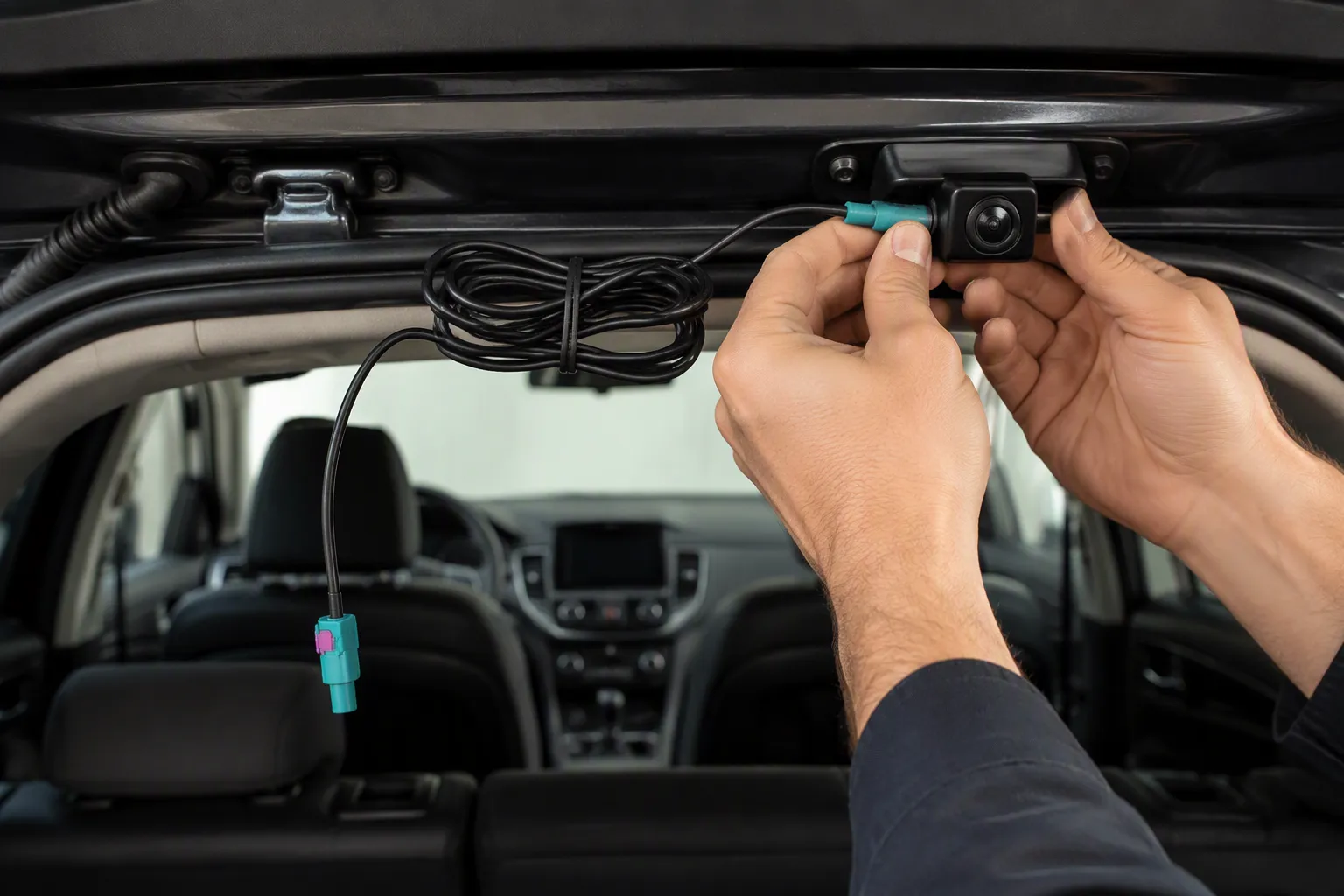
You might need a longer cable for your rear-view camera. A FAKRA extension cable is a specialized cable with FAKRA connectors. It extends the signal path between your rear camera and the vehicle's display or head unit. The rear camera sits far from the head unit. The factory cable is often too short for aftermarket installations. You can use this extension to avoid splicing or cutting the factory wiring. This cable preserves video signal quality over longer distances. It is designed for automotive use and ensures a secure connection.
Key Takeaways
A FAKRA extension cable extends the signal path between your rear camera and head unit without cutting factory wires.
FAKRA connectors use color coding and locking mechanisms to ensure a secure, interference-free connection.
Choose the right cable length and connector type for your vehicle to maintain signal quality.
Route the cable away from power wires and secure it to avoid interference and wear.
You can install a FAKRA extension cable yourself, saving time and avoiding splicing.
What Is a FAKRA Connector?
A FAKRA connector is a standardized radio frequency connector class used in vehicles. FAKRA stands for Automotive Industry Working Group, a German term for the automotive industry working group that developed it. You will find these connectors in many places inside a car. They handle GPS, infotainment, and camera signals. The design follows strict rules. This ensures every FAKRA connector works with others from different manufacturers.
FAKRA Basics for Rear Cameras
A FAKRA connector uses a coaxial design. A center pin carries the signal. A metal shield surrounds the pin and blocks outside noise. A plastic housing holds everything together. The housing comes in many colors. Each color marks a specific use. For example, a blue FAKRA connector often carries GPS. A water blue one fits all applications. This color system stops you from plugging a cable into the wrong port.
Several international standards define how a FAKRA connector must perform. These standards keep quality high across brands.
Standard | Description |
|---|---|
USCAR-17 / USCAR-18 | Automotive RF connector performance specification and FAKRA SMB RF connector supplement |
DIN 72594-1 | German standard for FAKRA connectors |
ISO 20860-1 | International standard for FAKRA connectors |
These standards ensure interoperability, durability, and performance consistency. A FAKRA connector from one supplier will mate with a FAKRA connector from another. That matters when you install an aftermarket camera.
Leadsign is an example supplier. This company offers FAKRA, HSD, and Mini FAKRA connectors, adapters, and cables. They serve the automotive market with a focus on signal integrity.
Why Rear Cameras Rely on FAKRA
A rear camera sends video data to your head unit. That data travels as a high-speed signal. Standard copper wire cannot carry it well over long distances. The signal weakens and picks up noise. A FAKRA cable solves this problem. It carries LVDS video data, which stands for Low-Voltage Differential Signaling. This method sends video at high speed with low power use.
The FAKRA design keeps the signal strong. The shielded coaxial structure blocks electromagnetic interference from the engine, alternator, and other electronics. The locking mechanism holds the connection tight. Vibrations from the road will not loosen it. Moisture and dust stay out thanks to the sealed housing.
You get a clear, stable image on your display. The camera works in rain, heat, and cold. The connection survives years of driving. That is why automakers choose FAKRA connectors for rear camera systems. The same reason applies when you add an aftermarket camera to your vehicle.
Why Automotive Camera Systems Need an Extension Cable
The Distance Problem: Camera to Head Unit
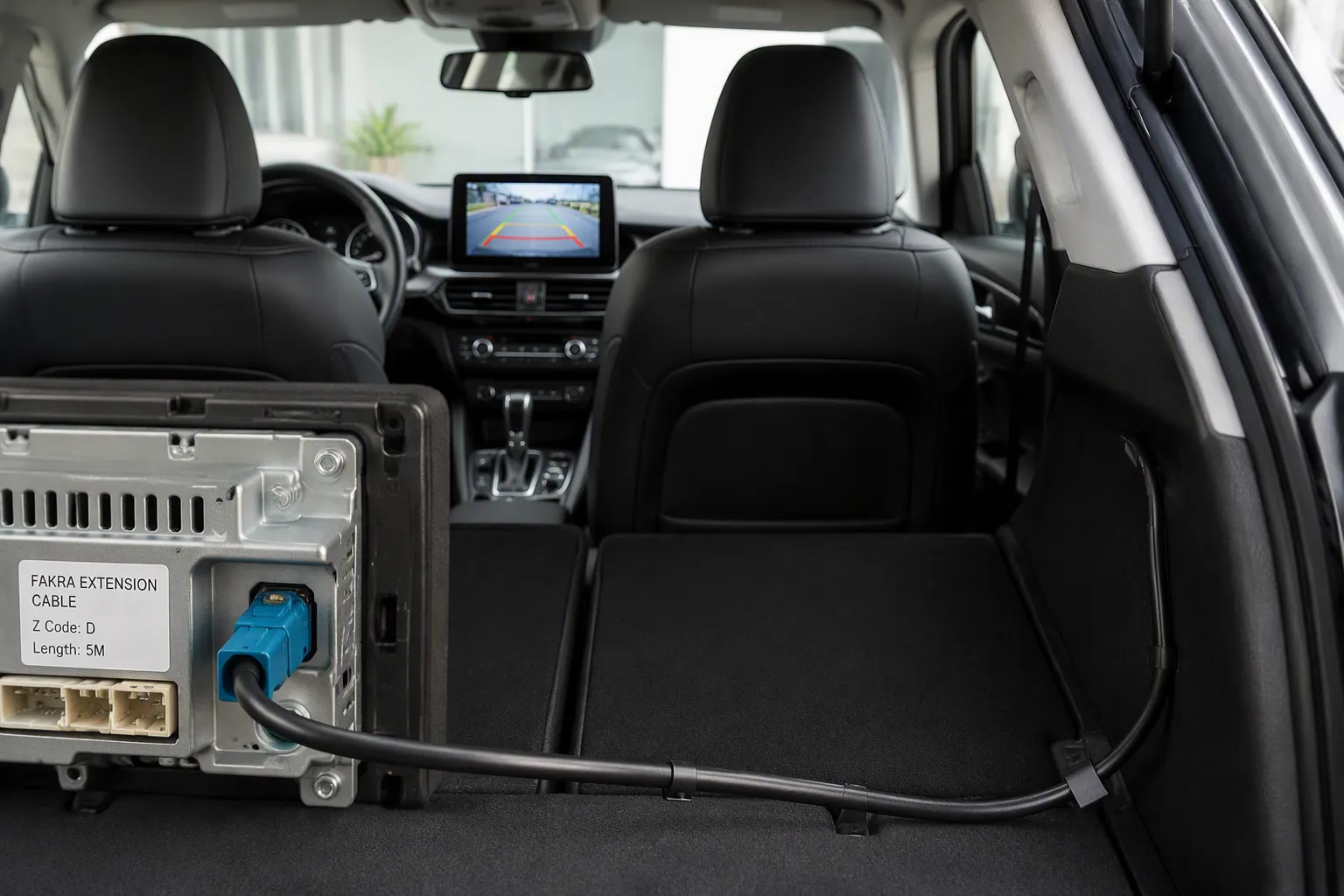
Your rear camera device sits at the very back of your car. The display screen waits at the front dashboard. The gap between them can span the full length of your vehicle. A sedan may have 15 to 20 feet separating the two points. A large SUV or truck adds even more distance.
The video signal from the reversing camera system must travel that full path. It passes near the engine, alternator, and other electronics. These parts create electromagnetic interference. That interference can corrupt the signal. You see static, flickering, or a dim image on your screen.
A standard wire loses signal strength over this distance. The picture becomes fuzzy or unreliable. The FAKRA connector and coax design solve this. The metal shield blocks outside noise. The proper impedance keeps the signal clean. Your image stays sharp from the unit to the display. This design is built for automotive use and survives harsh conditions.
This is why automotive camera systems rely on FAKRA. The connection stays secure even with road vibration. The sealed housing blocks moisture. You get reliable performance in all weather conditions.
When the Factory Cable Falls Short
Factory wires match one specific setup. The length fits the exact path from the device to the head unit. This works well in the factory. It fails when you make changes.
You may add an aftermarket unit. You might upgrade to a larger display. You could install a 360° surround view system. These changes shift the position of the sensor or head unit. The factory wire no longer reaches.
Some people splice wires to extend the length. This creates problems. Every splice is a weak point. A bad crimp causes signal loss. You spend hours troubleshooting.
A pre-assembled FAKRA extension cable avoids all these issues. You plug it in and you are done. The table below shows the difference.
Metric | Pre-assembled FAKRA extension cable | Fabricating custom harness |
|---|---|---|
Relative cost | ~5× more than discrete connectors | Baseline (lower unit cost) |
Installation time | Saves 3–5 hours of labor | Requires 3–5 additional hours |
Failure risk | Eliminates crimp failure risk | Crimp failure risk present |
Best for | Fewer than 5 units | 20+ units (evaluate crimp tool ROI) |
For a one-time installation in your own car, the pre-assembled option wins. You save three to five hours of labor. You avoid buying crimp tools. You remove the risk of a bad connection.
The automotive systems you use every day need this reliability. A loose connection can fail when you back up. The FAKRA cable gives you a professional-grade solution.
You do not cut any factory wiring. The harness connects directly between the sensor and the head unit. Your car stays unchanged. You get a longer signal path without losing quality.
Key Features of a FAKRA Cable
Impedance and Shielding
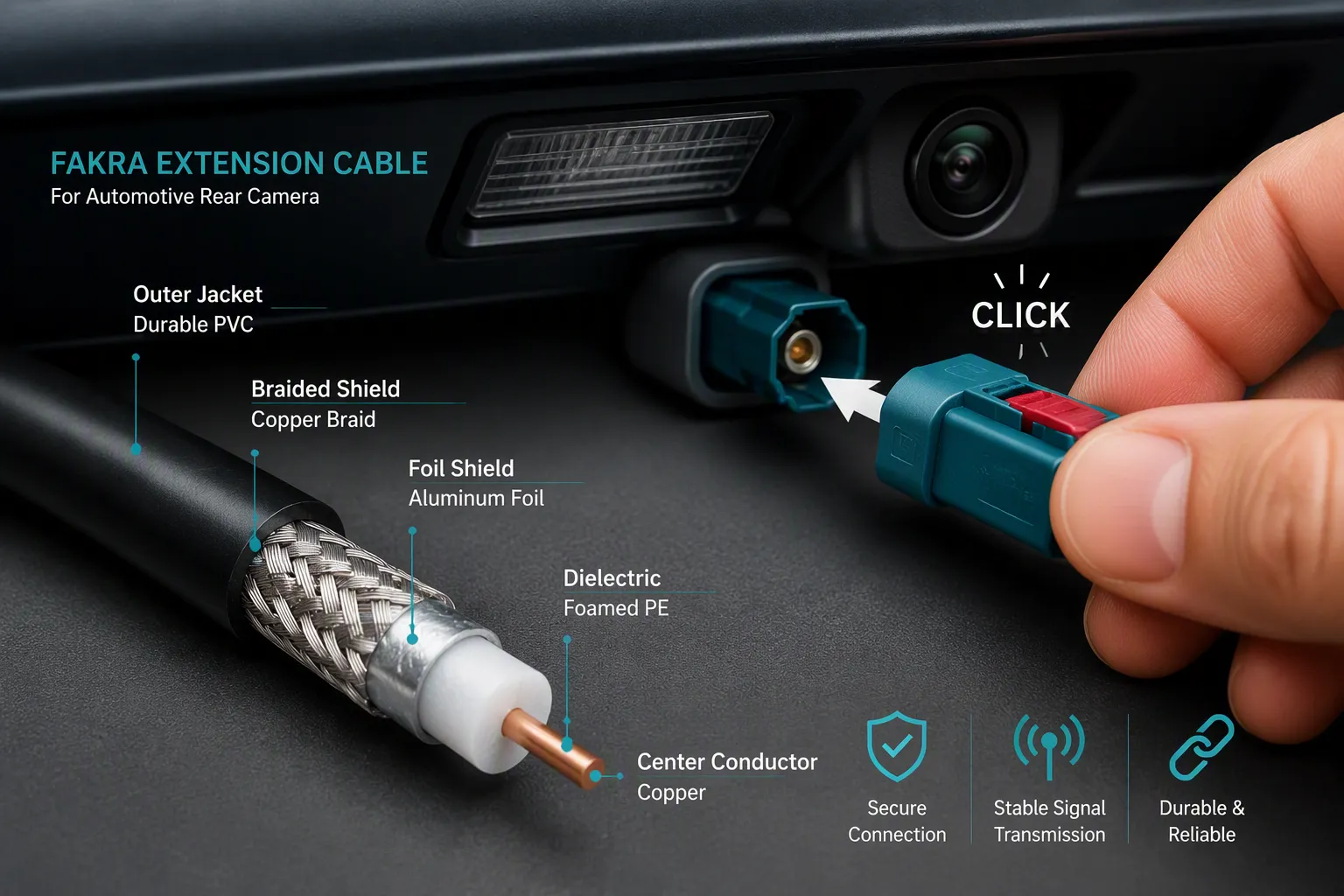
A FAKRA cable must maintain a precise impedance. Most vehicle video systems use 50 ohms. Your camera needs this match to send clean high-definition video signals. Mismatched impedance causes signal reflection. The video signal bounces back toward the source. You see ghosting or dim images on your display. The cable design prevents this problem with consistent conductor spacing and a stable dielectric material. This keeps the signal path uniform from the camera to the head unit.
Shielding protects the signal from electromagnetic interference. Your vehicle creates plenty of noise. The engine, alternator, and electric motors all emit interference. Without proper shielding, you see static or rolling bars on your screen. Different FAKRA cables use different shielding levels. The table below shows common options.
Shielding Type | Coverage | Best Use |
|---|---|---|
Single braid | 95% coverage | Short interior runs with low noise |
Double braided copper | Silver-plated, low loss | Extreme EMI environments near motors |
Foil + braid | Ultra low loss | Long runs over 10 meters for high-definition video signals |
Double shielding | Full rejection | EV/hybrid environments with inverter noise |
Choose double shielding if you run the FAKRA cable near the engine bay. This keeps the signal clean over the long distance to your head unit. Skilled assemblers use construction techniques like turning the braided sleeve inside out and wrapping copper foil over the prepared area. They also apply laser cutting for the aluminum foil and dielectric layers. These methods preserve the electromagnetic shielding performance throughout the cable assembly.
Weatherproofing and Locking Design
FAKRA connectors use a robust locking mechanism based on the USCAR-17 standard. You push the connector in until you hear an audible click. This confirms a stable connection. The lock prevents accidental disconnection from road vibration or cable tension. Your camera keeps sending a clear image even on rough terrain. The design also includes color-coded housings for different applications. This helps you match the correct cable to your camera system without confusion.
Weatherproofing keeps moisture and dust out. A rubber O-ring inside the connector blocks water ingress. Your rear camera sits outside the vehicle. Rain, snow, and car washes will not affect the connection. The sealed design meets automotive durability standards for vibration, temperature cycling, and corrosion resistance. This ensures long-term reliability in harsh driving conditions.
These features preserve signal integrity over longer distances. The cable maintains its impedance from end to end. The locking mechanism holds the connection steady. The weatherproofing protects against the elements. You get a reliable system that works for years without signal degradation or connection failure.
FAKRA Cables vs. Standard Coaxial Cables
Locking Mechanism and Color Coding
A standard coaxial cable uses a push-on or screw-on connection. These connections work fine in a home stereo system. They fail in a moving vehicle. Road vibration shakes the connector loose over time. A FAKRA cable uses a positive locking mechanism instead. You push the connector until it clicks. The lock holds the plug firmly in place. This design keeps your camera signal stable on rough roads.
Color coding is another major difference. Standard coax cables look identical. You cannot tell which cable carries which signal. A FAKRA cable uses colored plastic housings to mark each application. This system helps you match the right cable to the right port. The table below shows common FAKRA color codes.
FAKRA Code | Color | Common Application |
|---|---|---|
A | Black | AM/FM Radio |
C | Blue | GPS, GLONASS, GNSS |
E | Green | Terrestrial TV, DVB-T, SDARS |
G | Grey | Bluetooth, WiFi, WLAN |
I | Beige | Camera / Antenna control signal |
Z | Water Blue | Fits all |
You can see that a beige FAKRA connector handles camera signals. A blue one carries GPS data. This color system removes guesswork from your installation. You simply match the color to the port.
Fit and Reliability in Automotive Use
FAKRA cables offer a better fit for automotive use. The housing dimensions follow strict standards like USCAR-17 and DIN 72594-1. Every connector mates with every other connector that meets these standards. You get a secure fit without forcing the plug. Standard coax cables vary in size between brands. They may not seat properly in a tight dashboard space.
Reliability matters most in automotive systems. Your vehicle experiences temperature swings, moisture, and constant vibration. A FAKRA cable handles these conditions with a sealed housing and a metal shield. The locking tab prevents accidental disconnection. Standard coax cables lack these features. They may work for a short time. They often fail when you need them most.
The FAKRA design also protects signal integrity. The shielded coaxial structure blocks interference from the engine and alternator. Your camera sends a clean video signal to the head unit. You see a sharp image every time you shift into reverse. That level of reliability makes FAKRA cables the right choice for any automotive camera systems project.
Choosing and Installing a FAKRA Extension Cable
Length, Connector Type, and Compatibility
You must pick the right length for your setup. Measure the path from your camera to the display. Add a little extra for curves and slack. A cable that is too short will not reach. A cable that is too long may coil and pick up noise. Match the length to your specific vehicle layout.
Connector type matters just as much. Some fakra extension cable options use a FAKRA E male to RCA male setup. This works well for aftermarket displays. The FAKRA E end plugs into your camera. The RCA end fits many aftermarket head units. Check both ends before you buy. Make sure the fakra connectors match your ports.
Vehicle compatibility is the third key factor. Not every car uses the same fakra pin layout. Some models use different keying or color codes. Verify your camera model and head unit inputs first. A mismatched fakra cable will not seat properly. You may damage the pins if you force it.
Routing Tips to Avoid Interference
Route your cable away from power wires. The alternator and ignition system create electrical noise. This noise can degrade your high-definition video signal. Keep the fakra cable at least a few inches from these sources. Cross other wires at a 90-degree angle if you must pass them.
Secure the cable with clips or zip ties. Loose cables rub against metal and wear through the shield. A damaged shield lets interference reach the signal. Keep bends gentle and avoid sharp turns. The connection at each end should click into place. A firm, locked connection keeps your camera image stable on the road.
Test the system before you reassemble the interior. Shift into reverse and check the display. A clean image means your routing works. Adjust the path if you see static or flicker.
A fakra extension cable does more than add length. It preserves signal integrity between your rear camera and the display. You get a clear image without static or dropouts.
Focus on three buying points: correct length, proper connector type, and vehicle compatibility. Match the fakra cable to your specific camera setup. Do not grab any coaxial cable from your toolbox. A standard cable lacks the locking mechanism and shielding that automotive systems require.
Route your fakra cable away from power wires. Secure every connection until it clicks. These steps keep your video signal clean for years of reliable driving.
FAQ
Can I use a standard coaxial cable instead of a FAKRA cable?
No. A standard coaxial cable lacks the locking mechanism and color coding that automotive systems require. Road vibration can loosen a standard connection. A FAKRA cable clicks into place and stays secure. The shielded design also blocks interference from your engine and alternator.
How do I know which FAKRA color code I need?
Check the port on your camera and head unit. Match the color of the FAKRA housing to that port. A beige connector typically handles camera signals. A blue one carries GPS data. Your vehicle manual or the port label will confirm the correct code.
What happens if my FAKRA extension cable is too long?
An overly long cable may coil behind your dashboard. This can pick up noise from nearby electronics. Measure the path from your camera to the display first. Add a little slack for curves. Then choose the shortest cable that still reaches.
Can I install a FAKRA extension cable myself?
Yes. The connectors push in until they click. You do not need to splice or cut any factory wiring. Route the cable away from power wires. Secure it with zip ties. Test the display before you reassemble the interior panels.
Will a FAKRA extension cable work with my aftermarket display?
It depends on the connector type. Some cables use a FAKRA E male to RCA male setup. The FAKRA end plugs into your camera. The RCA end fits many aftermarket head units. Check both ends before you buy to confirm compatibility.
See Also
Why FAKRA Z Connectors Matter In Automotive Systems
Improving Vehicle Data Transfer Using FAKRA PCB Connectors
Examining Advantages Of Fakra Connectors In Cars