FAKRA to SMA Male vs Female adapter selection

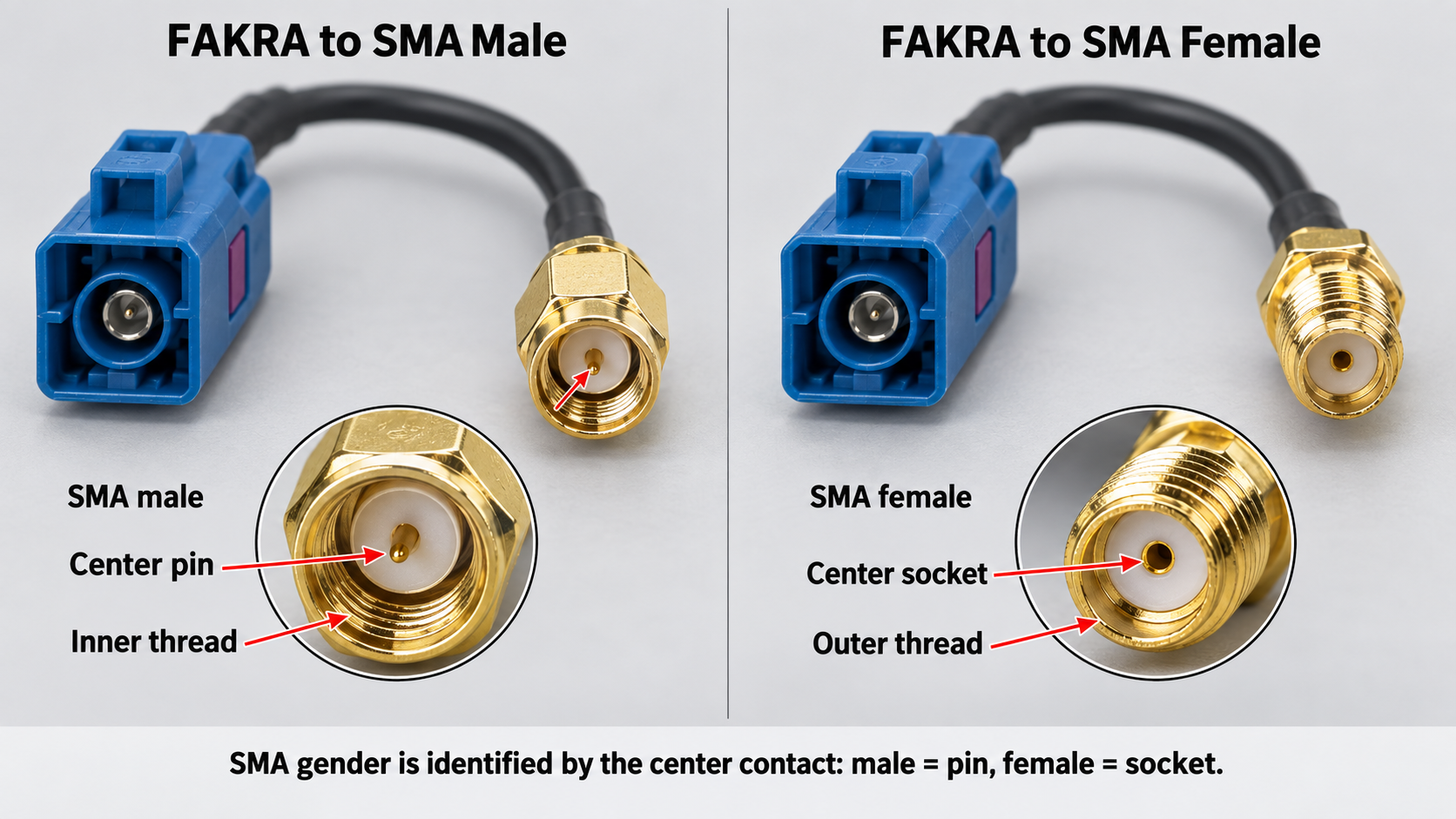
A buyer orders a FAKRA to SMA adapter for a GPS antenna project. The SMA side will not mate. The buyer judged gender by the outer thread instead of the center pin. This selection error delays installation.
Match the SMA gender to the SMA port on your device. A male fitting goes to a female SMA port. A female fitting goes to a male SMA port. Confirm the FAKRA connector side by coding, color, and orientation. Check the fakra code on FAKRA connectors before you buy.
TL;DR: Check the center contact, not the thread. SMA male has a pin; SMA female has a socket. Match that to your device port. Then confirm FAKRA coding and gender.
Key Takeaways
Check the center pin or socket to identify SMA gender, not the outer thread.
Match the SMA gender to your device port to avoid damage and delays.
Confirm FAKRA coding, color, and orientation to ensure compatibility.
Verify all connector details with photos, drawings, or part numbers before ordering.
Keep cable length short and shielding high for strong signal performance.
Why SMA Gender Selection Matters for a FAKRA to SMA Adapter
The Cost of Choosing the Wrong SMA Gender
You define SMA gender by the center contact, not by the outer thread or nut. A male SMA connector carries a center pin. A female SMA connector carries a center socket. This distinction controls every mating decision on your FAKRA to SMA adapter.
Order the wrong gender and the adapter will not mate with your device. You might try to force the connection. That force bends or breaks the center pin. A damaged pin ruins the adapter and may damage the mating port on your GPS receiver or LTE radio. You then face return shipping, replacement orders, and project delays.
Return costs add up quickly. Many suppliers place the burden on you for buyer error. One vendor policy states:
Customer Remorse (Buyer Error): If you changed your mind, ordered the wrong connector type, or no longer need the item, the customer is responsible for the return shipping costs.
Some suppliers also charge restocking fees. Documented policies include a 15% restocking fee at one vendor and a 10% restocking fee at another for customer-error returns. Shipping costs are often non-refundable. A refund may be denied if the item arrives damaged or used.
How Gender Affects Mating and Signal Path
FAKRA is a 50-ohm automotive RF connector system. SMA connectors serve RF modules, GPS/GNSS receivers, LTE/5G antennas, and test equipment. Both sides must present the correct gender for a reliable signal path.
A correct mating pair joins the center pin to the center socket with steady contact pressure. An incorrect connection leaves an air gap or a loose fit. That gap changes the impedance at the junction. Signal reflection rises. Your GPS lock time may lengthen. Your LTE throughput may drop.
Check compatibility before you order. Confirm the SMA side by center contact, photo, drawing, or part number. Confirm the FAKRA connector side by coding, color, and orientation. This step protects your RF performance and avoids unnecessary returns.
How to Identify SMA Male and Female Connectors
Reading the Center Pin and Center Socket
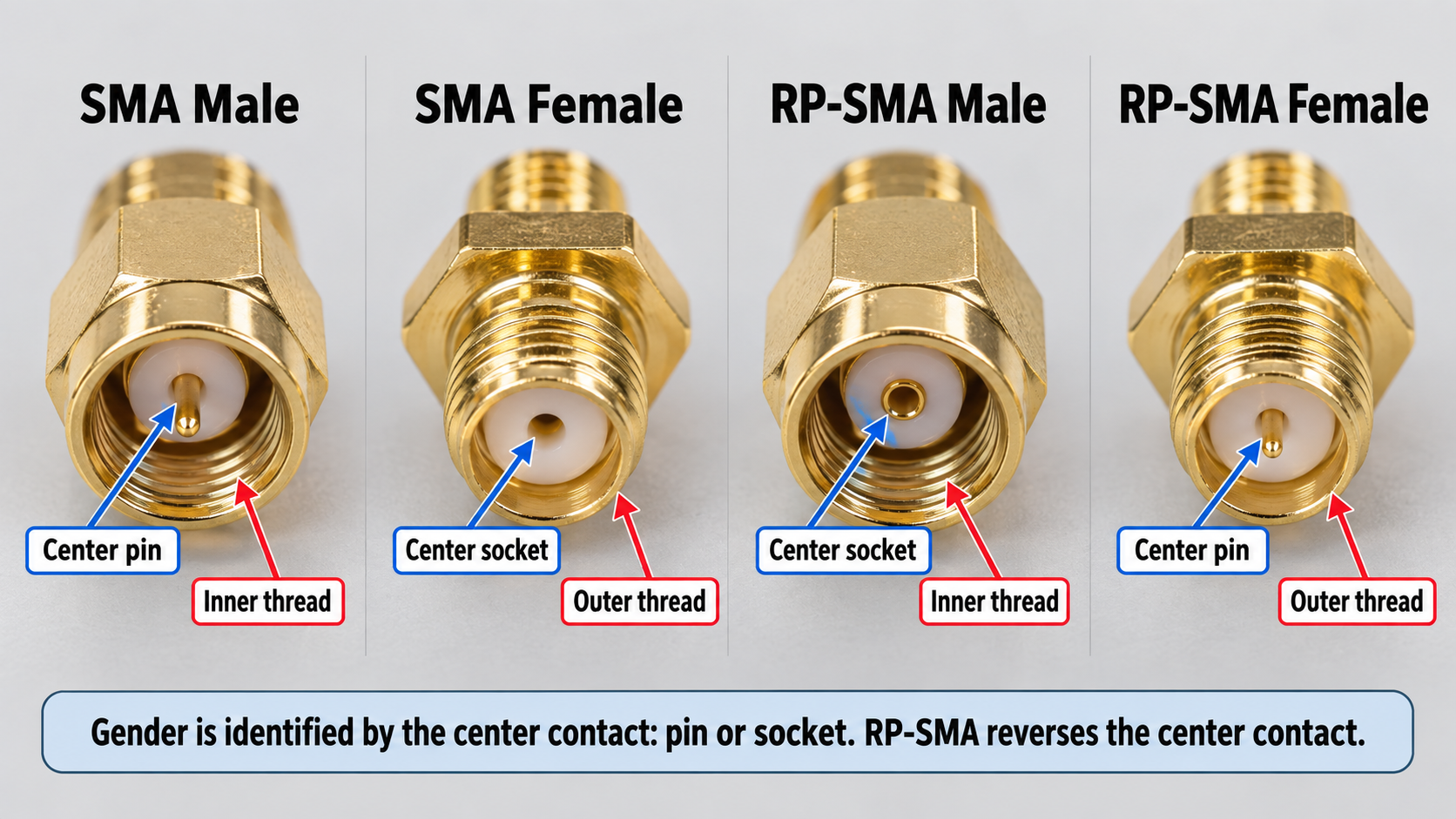
You identify SMA gender by the inner contact. A male SMA connector holds a center pin. A female SMA connector holds a center socket. The outer threads do not define gender. This rule applies to every SMA connector and fakra connector you handle.
Start with the threads. Internal threads indicate a male or plug body. External threads indicate a female or jack body. Then check whether the center contact is a pin or socket. This two-step method separates standard SMA from RP-SMA.
Both SMA male and RP-SMA male connectors have internal threads on their outer shell. Both SMA female and RP-SMA female connectors have external threads. The threads alone cannot tell you the full story. You must look inside.
Standard SMA vs RP-SMA: What Buyers Must Check
Standard SMA and RP-SMA are not the same. RP-SMA reverses the center contact configuration. An RP-SMA male carries a center socket. An RP-SMA female carries a center pin. This reversal breaks compatibility with standard SMA ports.
RP-SMA dominates consumer Wi-Fi gear. Most home routers ship with RP-SMA ports. This design prevents users from attaching high-gain antennas too easily. It is a small regulatory trick, not a technical one. Many routers and access points use RP-SMA female jacks on the device. These jacks typically have external threads and a center pin. They mate with RP-SMA male antenna connectors, which typically have internal threads and a center socket.
You must check your device before you order a fakra to sma adapter. A standard SMA port will not mate with an RP-SMA plug. The center pin and center socket will collide. This mistake damages both sides.
Use the table below to confirm gender by center contact.
Connector Type | Center Contact | Outer Thread/Nut | Typical Mating Part | Buyer Check |
|---|---|---|---|---|
SMA male | Center pin | Internal threads | SMA female | Confirm pin presence |
SMA female | Center socket | External threads | SMA male | Confirm socket presence |
RP-SMA male | Center socket | Internal threads | RP-SMA female | Confirm reversed contact |
RP-SMA female | Center pin | External threads | RP-SMA male | Confirm reversed contact |
FAKRA connectors use a different push-lock and keying system. Do not identify FAKRA mating by thread type. Confirm the FAKRA side by code letter, color, keying, mating face, photo, drawing, or part number.
Confirm gender by center contact, photo, drawing, or part number. Never guess by gender from the outer shell alone. A clear photo of the mating face settles the question. A part number from the datasheet removes all doubt. When you compare fakra and sma connectors side by side, the difference in mating style becomes obvious. The FAKRA connector uses a push-lock with keying. The SMA connector uses a threaded coupling.
FAKRA Connector Side: Coding, Color, Gender, and Orientation
Matching FAKRA Coding and Color to the Device
FAKRA connectors use color coding and mechanical coding to prevent mismating. Each code pairs a specific color with a keying pattern. This system helps reduce the risk of plugging a GPS line into the wrong RF port. The table below shows common FAKRA coding references used in many automotive RF applications. However, actual vehicle assignments can vary by OEM, market, supplier, and project. Always confirm the code letter, keying, color, and mating connector before ordering.
Code | Color | Common application |
|---|---|---|
C | Signal Blue | GPS / Navigation / GNSS |
D | Bordeaux Violet | Cellular / Telematics / RF antenna |
K | Curry | SDARS / Satellite Radio |
You should still confirm the final selection by drawing, sample, photo, or part number. Color alone does not guarantee a match across suppliers. A blue housing from one vendor may not key the same way as another. When you learn how to choose the right fakra connector, you check the code letter and the keying ribs together.
Forcing the wrong code causes real damage. Consider this warning:
Forcing a Code C plug into a Code B jack causes the plastic ribs to clash, breaking the housing and destroying the connector's structural integrity. This also prevents proper RF contact.
FAKRA Plug vs Jack and Mating Direction
FAKRA connectors come in male and female versions. The male, or plug, carries a center pin and keying ribs. The female, or jack, holds a center receptacle. You must match the gender on your adapter to the gender on your device port.
Orientation also matters. FAKRA connectors come in straight and right-angle bodies. A right-angle body redirects the cable parallel to the mounting surface. This reduces protrusion height and relieves the tight bend radius a straight connector would demand in shallow spaces. Behind-dash GPS modules often need this shape because depth is limited.
One final check: do not confuse FAKRA 50-ohm RF connectors with HSD 100-ohm differential connectors. They serve different signal types. For automotive electronics work, confirm the impedance and the connector family before you order.
Real-World FAKRA to SMA Adapter Use Cases and RF Performance
GPS, GNSS, LTE, and Telematics Applications
You encounter three common configurations in automotive RF projects. If your device has a FAKRA jack, the adapter must use the mating FAKRA plug side. If your device has a FAKRA plug, the adapter must use the mating FAKRA jack side. On the SMA side, choose the opposite gender of the SMA port or antenna connector you need to mate. For bulkhead mount cable assemblies, confirm both mating sides by drawing, sample photo, or part number before ordering. These FAKRA to SMA adapter types support GPS, GNSS, LTE/5G, AM/FM, telematics, navigation, and infotainment systems. FAKRA connectors are widely used as automotive RF interfaces for these signals. Some vehicle GPS and GNSS receivers use multiple frequency bands to improve positioning accuracy.
Common GPS frequency examples include:
Band | Frequency | Role |
|---|---|---|
L1 | 1575.42 MHz | Primary civilian signal with Coarse/Acquisition (C/A) code |
L2 | 1227.60 MHz | Military P(Y) code and modern L2C civilian signal; enables dual-frequency ionospheric correction |
L5 | 1176.45 MHz | Newer safety-of-life civilian signal for enhanced accuracy and interference rejection |
A single-band L1 antenna works for basic GPS navigation. Dual-band or triple-band antennas deliver higher accuracy for multi-constellation GNSS. Your FAKRA to SMA adapter must pass these frequencies with minimal loss. An SMA to FAKRA adapter can also serve as a test port for RF measurements. Suppliers offer FAKRA antenna adapters, FAKRA coaxial cables, and FAKRA cable connectors for these applications. You can view a FAKRA antenna adapter category, FAKRA coaxial cable category, and FAKRA cable connector category. They also build custom FAKRA cable assemblies tailored to your device and frequency requirements.
Cable Length, Shielding, and Signal Integrity
Cable length directly affects signal strength. For example, small-diameter coax such as RG-174 can have noticeable loss at GPS L1 frequency. Exact attenuation depends on the cable manufacturer, cable construction, frequency, and datasheet. For longer runs, buyers may need a lower-loss cable, shorter routing path, active antenna design, or custom cable assembly after checking the receiver and antenna requirements. Shielding also matters. Double-shielded or foil‑braided cables block interference from vehicle electronics. Connector termination quality affects impedance. A poorly soldered joint creates a mismatch that increases return loss. Each adapter you add in the signal path introduces insertion loss and can worsen VSWR. Keep the number of adapters to a minimum for best performance. When you specify a FAKRA connector for your assembly, confirm the cable type and shielding level with your supplier.
FAKRA to SMA Adapter Selection Checklist
Pre-Order Verification Steps
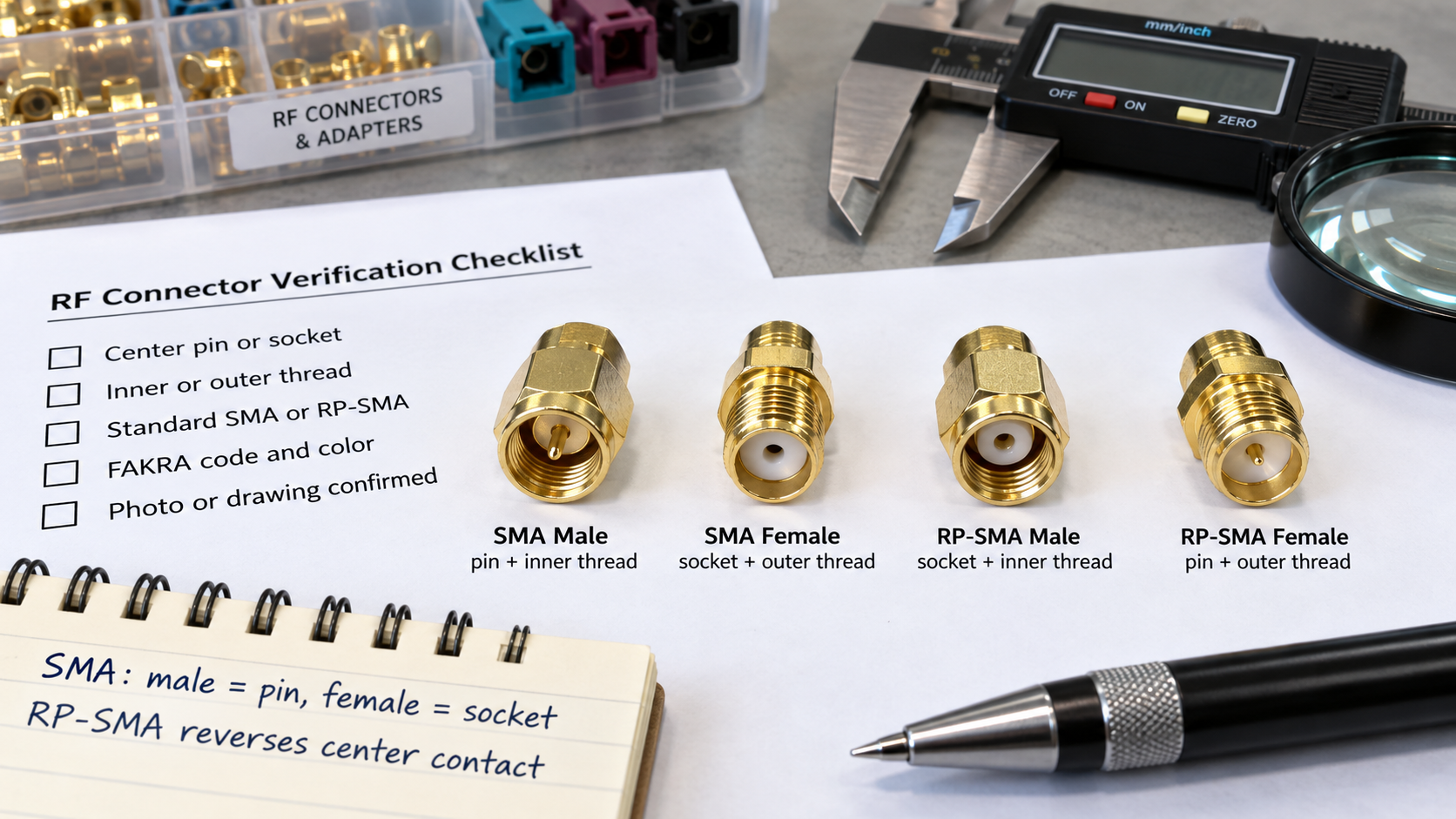
You should verify the SMA port on your device before you order. Start with the center contact. For standard SMA, a center pin with internal threads indicates SMA male. A center socket with external threads indicates SMA female. For RP-SMA, the center contact is reversed: RP-SMA male has a center socket with internal threads, while RP-SMA female has a center pin with external threads. This method is more reliable than trusting listing titles, especially for adapters where you must check each end separately.
Check the mating side for standard SMA versus RP-SMA. These two types can look similar in small photos. The thread may appear compatible, but the center contact arrangement differs. A standard SMA female should not be treated as interchangeable with an RP-SMA female. Despite looking almost identical, SMA and RP-SMA differ in internal polarity and are not interchangeable. Mechanical fit does not guarantee electrical connection. Using mismatched interfaces leads to open circuits, signal loss, or communication failure.
A quick photo with zoom often reveals the center contact clearly enough to confirm. This approach is faster than trial and error and prevents bent pins. Request a front-face photo to confirm gender and polarity. Ask for a rear-side photo to confirm mounting style. Use a caliper photo to confirm panel hole size, thread length, and body diameter when replacing an existing connector.
Product photos cause trouble because the thread is easier to see than the contact. A buyer sees an external thread and assumes male, or sees a center socket and assumes female, without checking the complete interface. For example, if you simply bought an RP-F to SMA-F coupler without knowing better, you could spend weeks troubleshooting.
Use this checklist when you order a fakra to sma adapter:
FAKRA code and color
FAKRA gender
FAKRA orientation
SMA male or female
Standard SMA or RP-SMA
Cable type
Cable length
Impedance
Shielding requirement
Frequency and application
Mating device or antenna
Drawing, sample photo, or part number
Quantity
Information to Send Your Supplier
A precise purchase note removes ambiguity. Write something like: "Standard SMA female jack, socket center contact, internal thread, mates with standard SMA male plug." This level of detail helps your supplier confirm the right fakra connector for your project.
When you request a quote for a custom assembly, send your supplier the latest drawing, BOM, and pin-to-pin table. List all interfaces and flag parts needing your approval before substitution. State cable construction, dimensions, branches, protection, and labels. Define required inspection and test evidence rather than assuming a generic regime. Separate prototype, pilot, and production quantity requirements with forecasts. Record unresolved interface, material, regulatory, or compatibility questions as RFQ confirmation required.
Your supplier will also need these specifications: impedance, frequency range, cable family, finished length, length tolerance, connector gender, orientation, mating connector, environmental rating, and test requirement. This information supports accurate quoting and reduces the risk of ordering errors.
You can contact a supplier with connector photos, drawings, samples, part numbers, device models, or antenna requirements. Their team supplies FAKRA antenna adapters, FAKRA coaxial cables, FAKRA cable connectors, and custom FAKRA cable assemblies. Visit a contact page to start your inquiry.
The deciding factor is simple. Match the SMA gender on your adapter to the SMA port on your device. A male fitting mates with a female port. A female fitting mates with a male port. Then confirm the FAKRA side by coding, color, gender, and orientation. This selection step prevents mating failures and return delays.
Verify both sides before you order. Use a drawing, photo, sample, or part number. Check the center contact on the SMA side. Check the keying and color on the FAKRA side. When you confirm these details, you get the right fakra connector for your project. Contact a supplier with your connector photos, drawings, samples, part numbers, device models, or antenna requirements. Their team supports FAKRA to SMA adapter selection for GPS, GNSS, LTE, and telematics applications.
FAQ
How do I know if my SMA connector is male or female?
Look at the center contact, not the outer thread. An SMA male holds a center pin. An SMA female holds a center socket. Check the mating face with a photo or drawing. This step confirms gender before you order any fakra to sma adapter.
Is RP-SMA the same as SMA?
No. RP-SMA reverses the center contact configuration. An RP-SMA male carries a socket, and an RP-SMA female carries a pin. Standard SMA and RP-SMA will not mate correctly. You must verify polarity on both fakra connectors and SMA ports before purchase.
Can I use a FAKRA to SMA adapter for GPS or LTE antennas?
Yes, when the adapter matches both sides. GPS and LTE systems use 50-ohm impedance. Confirm the FAKRA code and color for your application. Then match the SMA gender to your antenna port. This approach supports reliable performance in any vehicle installation.
What information is needed to order a custom FAKRA to SMA adapter?
Send your supplier the FAKRA code, color, gender, and orientation. Include the SMA gender, standard or RP-SMA type, cable type, and cable length. Add impedance, frequency, shielding needs, and a drawing or part number. These details help suppliers build the right fakra connectors for your project.
See Also
A Complete Guide To Understanding Fakra To SMA Connectors
Why Fakra To SMA Connectors Matter In RF Applications
An In-Depth Guide To Fakra Male Connectors